

Notion AI Review: Faster Docs, Summaries & Team Clarity (2026)
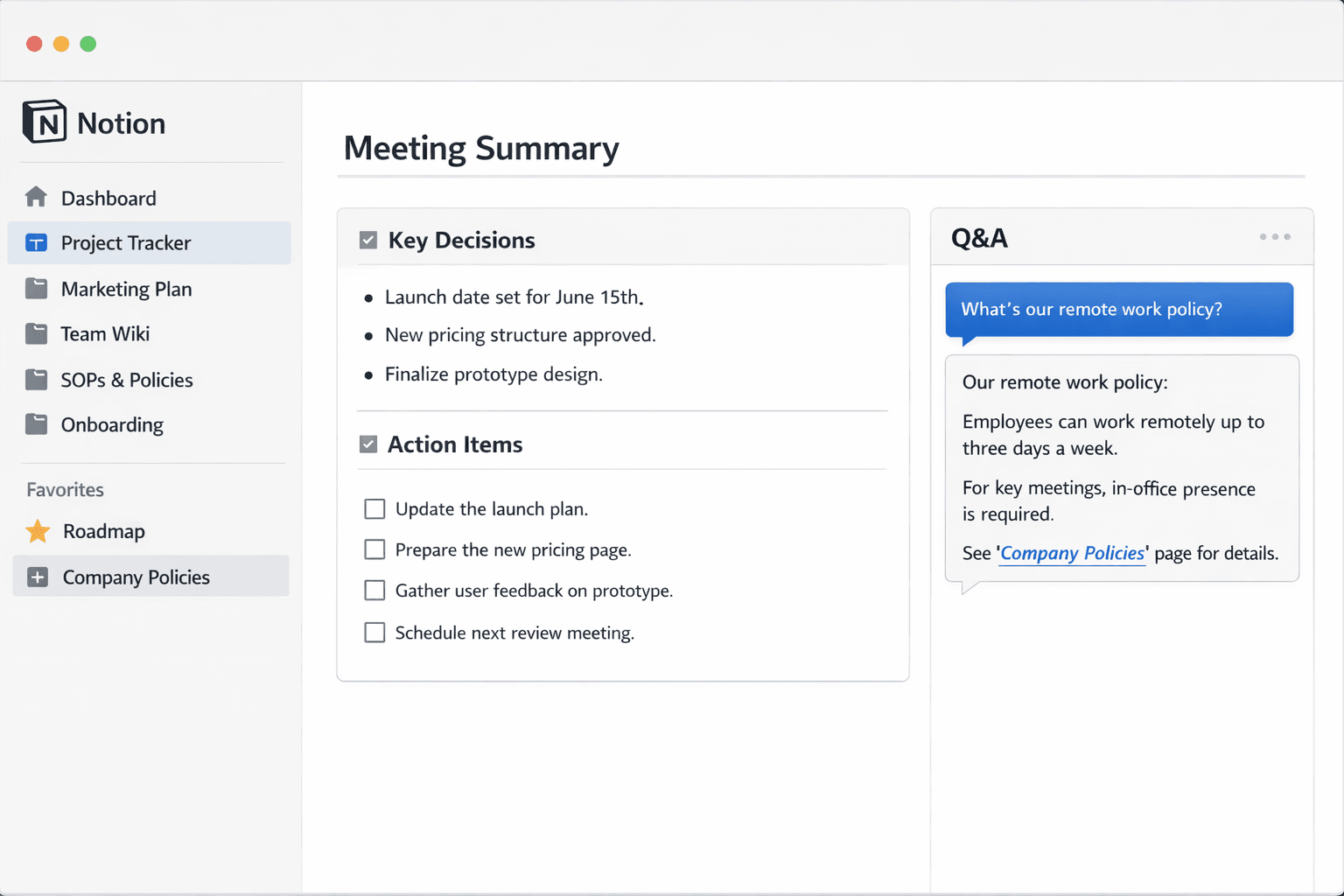
Notion AI Review… Small teams don’t fail because they lack ideas. They fail because the ideas get trapped in docs, scattered across chats, and buried under “quick questions” that aren’t quick at all. Notion AI aims to fix that by turning your workspace into something closer to a thinking partner: it helps you draft, summarize, rewrite, and pull clarity from messy pages so you can move from “we should” to “we did.”If you already live in Notion-project pages, meeting notes, product specs, onboarding docs-AI inside the same place is a big deal. Instead of copying text into a separate tool, you can generate first drafts where your team already collabora
tes, then refine them with context in mind. For small teams, that’s the real promise: fewer switches between apps, fewer half-finished documents, and less time spent turning raw notes into something actionable.But AI doesn’t magically fix a chaotic workspace. If your pages are inconsistent, permissions are messy, and templates are “whatever the last person did,” Notion AI can amplify confusion as easily as it amplifies productivity. This review focuses on what matters for small teams: speed, usefulness in day-to-day work, trust, and whether it genuinely reduces meetings and rework.
Top FeaturesNotion AI works best when your team uses Notion as a home base for knowledge and execution. The features below are the ones that most reliably translate into saved hours for small teams.In-page drafting and rewriting: Create outlines, rewrite for tone, shorten long text, or expand bullet notes into readable paragraphs-without leaving the document.Summaries that respect structure: Turn long meeting notes into key decisions, action items, and next steps. Great for async teams that can’t attend every call.Q&A over your workspace content: Ask questions like “What did we decide about pricing?” and get a guided answer that points you to relevant pages.
Translation and localization support: Useful if your small team works across regions and needs consistent messaging.Template acceleration: Generate a first version of SOPs, onboarding checklists, release notes, and policies, then customize with your team’s specifics.Database-friendly workflows: With the right setup, AI can help generate descriptions, summaries, or status updates tied to items in your workflow.Where it shines for small teams is speed-to-draft. Instead of staring at a blank page, you start with a competent baseline and spend your energy on accuracy and differentiation.
It’s also strong at compressing information: converting a long narrative into a crisp list of decisions and responsibilities.To get consistent results, small teams should standardize inputs. For example, use a meeting template with sections like “Context,” “Decisions,” “Risks,” and “Action Items.” Notion AI performs better when it can see predictable structure and clear nouns (project names, owners, dates).
In practice, Notion AI is most valuable when it removes friction from three recurring small-team problems: writing, alignment, and retrieval.Writing: from scratch to usableNotion AI is a strong “first draft engine.” It can quickly produce product briefs, internal announcements, FAQs, customer emails, or onboarding docs that are coherent enough to share internally. The win isn’t that the AI writes “better than humans.” The win is that it gets you to a version 0.7 in minutes, so your team can edit collaboratively and ship.The risk: generic language. If you accept drafts without injecting specifics-metrics, real customer constraints, your unique tone-you’ll end up with content that feels polished but empty.
The best workflow is to treat AI output as a scaffold, then add the real substance: examples, screenshots, decisions, and non-obvious tradeoffs.Alignment: summaries that enable asyncFor small teams, alignment is expensive. Notion AI’s summaries help convert long notes into something skimmable. That enables async updates: a teammate can catch up in five minutes instead of scheduling another meeting. The best outputs come from notes that clearly separate “discussion” from “decision.” If everything is mixed together, summaries can misrepresent what was actually decided.Retrieval: reducing “where is that doc?”Q&A over the workspace is the most strategic feature-when it works. If your Notion is your source of truth, being able to ask for decisions, policies, or context is powerful.
But it depends on your workspace hygiene: consistent naming, clear ownership, and sensible permissions. If your team has multiple half-duplicate pages, AI will surface “an answer” without guaranteeing it’s the right answer. A simple mitigation is to maintain a small set of canonical pages (Roadmap, Pricing, Support Policy, Brand Voice) and link to them often.Trust, safety, and team habitsSmall teams should adopt lightweight rules: don’t publish AI-generated external content without a human pass, and don’t treat AI answers as authoritative without checking the source page.
Use it to accelerate thinking, not replace judgment.Bottom line: Notion AI is a productivity multiplier if your workspace is already becoming organized. If it isn’t, the first investment should be templates, naming conventions, and a single source of truth-then the AI becomes worth it.
Verdict: For small teams already running on Notion, Notion AI is often worth paying for because it reduces the two biggest time drains: starting documents and extracting decisions from messy notes.Pricing varies by plan and whether AI is bundled or added per user, so the right way to judge it is by outcomes: does it eliminate a weekly status meeting, speed up onboarding by a day, or cut writing time for specs and announcements in half?
If you can point to even one repeatable workflow-meeting summaries to action items, standardized SOP drafting, or fast Q&A for internal policies-the ROI becomes obvious.If your team’s Notion is chaotic, you may feel disappointed at first. In that case, treat AI as the reward after a short cleanup sprint: standard templates, a handful of canonical pages, and clean permissions. Do that, and Notion AI becomes a practical, daily tool instead of a novelty.
Notion AI for Small Teams: The Real Problem It’s Solving
Small teams don’t fail because they lack ideas. They fail because the ideas get trapped in docs, scattered across chats, and buried under “quick questions” that aren’t quick at all. That creates a slow bleed of coordination cost: repeated explanations, duplicated pages, and decisions that get made twice because nobody can find the last one.
Notion AI aims to fix that by turning your workspace into something closer to a thinking partner: draft where you collaborate, summarize what happened, rewrite for clarity, and help pull answers from existing pages so the team can move from “we should” to “we did.” The value is not that it writes better than your team. The value is speed-to-usable: getting to a version that is good enough to edit and ship inside the system your team already uses.
The catch is that AI does not magically fix workspace chaos. If your pages are inconsistent, permissions are messy, and templates are “whatever the last person did,” AI can amplify confusion as easily as it amplifies productivity. Notion AI is best treated as a multiplier of good workspace habits, not a replacement for them.
Notion AI Review… Top Features That Actually Save Hours for Small Teams
Notion AI works best when Notion is already your home base for knowledge and execution: project pages, meeting notes, product specs, onboarding docs, and lightweight workflows. The highest ROI features are the ones that reduce switching costs and compress information.
1) In-Page Drafting and Rewriting
The most immediate win is drafting without leaving the document. Notion AI can generate outlines, expand bullets into paragraphs, shorten long text, rewrite tone, and restructure content into clearer sections. For small teams, this is how you kill the blank-page problem and keep docs moving.
- Best for: product briefs, internal announcements, onboarding docs, FAQs, retrospectives, SOPs.
- Why it matters: fewer app switches and faster collaboration on a shared draft.
- Main risk: generic language if you don’t inject specifics and constraints.
2) Summaries That Respect Structure
Summarization is most valuable when it separates discussion from decision. Notion AI can turn long meeting notes into key decisions, action items, and next steps, which enables async alignment: teammates catch up in minutes instead of scheduling another call.
- Best for: weekly syncs, product reviews, incident debriefs, planning meetings.
- Guardrail: keep “Decisions” and “Actions” sections so AI formats rather than infers commitments.
3) Q&A Over Workspace Content
The most strategic feature is asking questions over your workspace: “What did we decide about pricing?” or “What’s our support policy?” When it works, it reduces the constant “where is that doc?” interruption loop. This depends heavily on workspace hygiene: consistent naming, canonical pages, and clear ownership.
- Best for: policy lookup, onboarding, decision recall, product context retrieval.
- Risk: if you have duplicate pages, AI can surface “an answer” without guaranteeing it’s the right canonical one.
4) Template Acceleration for SOPs, Onboarding, and Policies
Small teams often need SOPs and policies, but writing them from scratch is slow and gets postponed. Notion AI can draft a first structure quickly: purpose, scope, steps, exceptions, escalation paths, and definition of done. The best use is to start from a strong scaffold, then fill in your team’s real edge cases.
- Best for: onboarding checklists, internal playbooks, release notes templates, incident response guides.
- Guardrail: require real examples and exceptions before declaring a doc “done.”
5) Database-Friendly Workflows
Notion databases can become a lightweight operating system for small teams: projects, tasks, support requests, content calendars. AI can help generate descriptions, summaries, or status updates tied to items in a database when your properties are consistent.
- Best for: content pipelines, project trackers, simple CRM, onboarding sequences.
- Key requirement: consistent properties and naming conventions.
The Three Recurring Small-Team Problems Notion AI Helps Most
In day-to-day operations, Notion AI tends to deliver real value in three areas: writing, alignment, and retrieval. These are where small teams lose the most time.
Writing: From Scratch to “Version 0.7” Fast
Notion AI is a strong first-draft engine. It can produce coherent briefs, internal announcements, onboarding docs, and FAQs quickly enough that your team can collaboratively refine and ship. The win is speed-to-baseline: you reach a usable draft in minutes, then spend your time on accuracy and differentiation.
The main risk is polished emptiness. If you accept drafts without adding specifics-metrics, constraints, real customer scenarios, tradeoffs-you’ll end up with content that sounds professional but doesn’t guide decisions. The best workflow is to treat AI output as a scaffold and then layer in substance: examples, decisions, screenshots, and explicit non-goals.
Alignment: Summaries That Enable Async Work
Alignment is expensive for small teams because meetings steal capacity. Summaries reduce that cost by letting people catch up asynchronously. The key is note structure. When notes clearly separate discussion from decision, AI can produce a reliable, skimmable summary. When everything is blended together, summaries can misrepresent what was actually agreed.
- Practical rule: every meeting note should have “Decisions,” “Actions,” and “Open Questions.”
- Operational benefit: fewer follow-up meetings and fewer repeated explanations.
Retrieval: Reducing the “Where Is That Doc?” Tax
Workspace Q&A is powerful when Notion is truly your source of truth. But retrieval quality depends on hygiene. If your workspace contains half-duplicate docs, inconsistent naming, or unclear ownership, AI can surface something plausible that isn’t actually the canonical answer.
A simple mitigation is to maintain a small set of canonical pages and link to them frequently, such as:
- Roadmap: what the team is building and why
- Pricing: current policy and decision history
- Support policy: response expectations and escalation
- Brand voice: tone rules and examples
- Onboarding hub: the single entry point for new hires
With canonical pages in place, AI answers are more likely to align with what the team actually uses.
Trust and Team Habits: Preventing AI From Amplifying Chaos
Notion AI can be a productivity multiplier, but small teams should adopt lightweight rules to keep trust high. The goal is to accelerate thinking and reduce coordination overhead without letting AI outputs become authoritative by accident.
Lightweight Guardrails That Work
- Human pass for external content: never publish AI-generated customer-facing content without review.
- Source-check for Q&A: treat AI answers as pointers to pages, not final truth.
- Canonical page discipline: keep one page per policy/topic and link to it often.
- Template standardization: meeting notes, specs, and SOPs should follow stable templates.
- Clear ownership: assign owners to major pages so updates aren’t random.
Why Templates Matter More Than Prompts
Teams often try to “prompt better” when AI outputs are inconsistent. In Notion, the bigger lever is template consistency. If your meeting notes always have the same sections and your project pages follow the same structure, AI has reliable anchors. That reduces hallucinated filler and improves the accuracy of summaries and action extraction.
When Notion AI Is Worth It (and When It Isn’t)
Notion AI is often worth paying for when your team already runs on Notion and regularly faces the two biggest time drains: starting documents and extracting decisions from messy notes. The right way to evaluate it is by outcomes, not by how smart it sounds.
Strong Fit
- Notion as home base: specs, notes, onboarding, and execution live in Notion.
- High writing volume: frequent briefs, updates, SOPs, and internal announcements.
- Async coordination needs: teams that want fewer meetings and better skimmable summaries.
- Knowledge retrieval pain: repeated questions and difficulty finding decisions.
Weak Fit
- Chaotic workspace: duplicates, unclear permissions, inconsistent templates.
- Low documentation culture: work happens in chat and pages are rarely updated.
- No canonical ownership: nobody maintains the pages AI is supposed to reference.
If your workspace is chaotic, AI can feel disappointing because it surfaces the same disorder in a faster format. In that case, treat AI as the reward after a short cleanup sprint: standard templates, a handful of canonical pages, and cleaner permissions.
Verdict: Notion AI for Small Teams
For small teams already running on Notion, Notion AI is often worth it because it reduces friction in the most common workflows: drafting docs, summarizing decisions into action items, and answering internal questions without endless interruptions. The best ROI comes from repeatable patterns: meeting summaries to actions, SOP template drafting, and workspace Q&A for policies and decisions.
Pricing varies by plan and whether AI is bundled or added per user, so the most practical evaluation is to measure time saved: does it eliminate a weekly status meeting, cut onboarding time by a day, or halve the time it takes to draft a spec or announcement? If you can point to even one workflow that repeats weekly, the ROI often becomes obvious. But the multiplier effect only shows up when your workspace has enough structure to be a reliable source of truth.
FAQ: Notion AI
What is the highest ROI use case for Notion AI?
Meeting note summaries into decisions and action items, plus fast first drafts for recurring docs like SOPs and onboarding. These workflows repeat frequently and save time immediately.
Does Notion AI reduce meetings for small teams?
It can, especially when summaries are used to enable async catch-up. The effect is strongest when meeting notes clearly separate discussion, decisions, and actions.
How reliable is workspace Q&A?
It’s most reliable when your workspace has canonical pages with consistent naming and ownership. If you have duplicates and inconsistent structure, Q&A can return plausible but non-canonical answers.
Will Notion AI write high-quality external content?
It can draft a baseline, but external content should always be reviewed and customized with your specifics. Otherwise it risks sounding generic and missing important constraints.
What should a small team fix before adopting Notion AI?
Standardize templates, clean up duplicate pages, define a handful of canonical pages, and set clear permissions and page ownership. AI becomes a multiplier after that structure exists.
Can Notion AI help with SOPs and onboarding?
Yes, it can draft strong scaffolds quickly. The team should then add real exceptions, examples, and escalation paths so the SOP reflects actual operations.
How should teams avoid “polished but empty” AI docs?
Treat AI output as a scaffold and require specifics: metrics, constraints, real scenarios, non-goals, and concrete examples. Review and edit collaboratively before treating the doc as authoritative.