

Notion AI review: Boost Productivity & Team Clarity (2026) Guide
Notion AI Review: 7 Key Features for Small Teams, Docs, Meetings, and Knowledge Management
Notion AI review
A decision might live in one meeting note. A process might be buried in an onboarding page. A product detail might be inside an old project brief. A teammate may ask, “Where is that doc?” even though someone already created it months ago.
This is the real problem Notion AI tries to solve.
Notion is already popular because it gives teams a flexible workspace for notes, docs, projects, databases, wikis, and lightweight collaboration. Notion AI adds an intelligent layer to that workspace. It can help teams draft content, summarize long pages, generate meeting notes, answer questions from workspace knowledge, support research, translate content, and turn messy ideas into structured documents.
This Notion AI review focuses on small teams that use Notion as their main workspace. It looks at how the AI features help with writing, documentation, meetings, knowledge retrieval, SOPs, onboarding, and async collaboration. It also explains where the tool works well, where it can disappoint, and what teams should fix before expecting strong results.
The short verdict is simple. Notion AI can be a strong productivity upgrade for small teams that already use Notion consistently. It is especially useful when teams need faster first drafts, cleaner meeting summaries, better internal documentation, and easier access to workspace knowledge. However, it does not magically fix a chaotic workspace. If pages are duplicated, templates are inconsistent, and permissions are messy, AI may surface confusion faster instead of creating clarity.
For the best results, small teams should use Notion AI with clear templates, canonical pages, clean page ownership, and human review for important outputs.
Notion AI Review: What Is Notion AI?
Key Aspects of Notion AI Review
Notion AI is the artificial intelligence layer inside Notion’s workspace. It helps users write, summarize, rewrite, translate, search, answer questions, create meeting notes, and work with existing content more efficiently.
Unlike a separate AI chatbot, Notion AI works inside the workspace where teams already store their knowledge. This matters because small teams often use Notion as a central hub for project pages, meeting notes, SOPs, product specs, content calendars, onboarding documents, internal policies, and databases.
Instead of copying text into another tool, users can generate and improve content directly inside Notion. They can summarize a long meeting note, rewrite a rough draft, ask questions about workspace content, create a database, draft an SOP, or turn raw notes into a structured document.
The biggest advantage is context. If a team already works in Notion, AI can support the same pages, docs, and workflows. That reduces app switching and keeps work closer to the source material.
For small teams, this can be a major time saver. A founder can draft an internal announcement faster. A product manager can summarize discovery notes. A marketing lead can create a content brief. An operations manager can turn a messy process into an SOP draft. A new employee can ask questions about internal policies instead of interrupting several teammates.
However, Notion AI should not be treated as a final authority. It can draft, summarize, and guide. It still needs human review, especially for external content, customer-facing information, legal topics, company policies, pricing decisions, and strategic documents.
The best use is simple: let AI create the first draft or summary, then let humans add judgment, examples, constraints, and final approval.
Why Small Teams Use Notion AI
Small teams have limited time. Every meeting, repeated question, unclear doc, and unfinished process creates friction. Unlike larger companies, small teams may not have dedicated operations, enablement, or documentation roles. The same people who plan the work also write the docs, answer internal questions, create onboarding materials, and update project pages.
That creates a hidden productivity cost.
A teammate may spend 30 minutes turning meeting notes into action items. Another may spend an hour writing a project brief from scratch. A manager may rewrite the same onboarding explanation for every new hire. A founder may answer the same policy question again because nobody knows where the official page lives.
Notion AI can reduce these small repeated costs.
It helps with three problems that appear again and again in small teams:.
Writing from scratch.
Summarizing messy information.
Finding answers inside the workspace.
These problems matter because they slow down execution. A blank page delays a project. A messy meeting note delays follow-up. A missing document triggers more interruptions. A duplicated page creates confusion about which information is correct.
AI can help create a faster path from raw information to usable output.
However, the quality of the result depends heavily on the workspace. A clean workspace with clear page names, templates, owners, and canonical pages gives AI better context. A messy workspace full of duplicate pages and vague notes produces weaker answers.
This is why Notion AI is best seen as a multiplier. It multiplies good workspace habits. It does not replace them.
7 Key Notion AI Features for Small Teams
1. In-Page Drafting and Rewriting
In-page drafting is one of the most useful Notion AI features for small teams. It helps users create outlines, expand bullet points, rewrite rough notes, shorten long text, adjust tone, and turn incomplete ideas into readable drafts.
This is useful because small teams often need many types of internal documents.
Examples include:.
Project briefs.
Internal announcements.
Product specs.
Meeting agendas.
FAQs.
SOPs.
Onboarding pages.
Customer email drafts.
Marketing outlines.
Policy drafts.
Release notes.
Retrospectives.
The main value is speed. Notion AI helps teams get to a usable first draft faster. The draft may not be perfect, but it gives the team something to edit. That is often better than staring at a blank page.
For example, a team lead may write a few rough bullet points about a new internal process. AI can turn those bullets into a structured page with purpose, scope, steps, responsibilities, exceptions, and next actions.
This saves time, but the team should still edit the result.
AI-generated drafts can sound polished while missing important details. They may lack company-specific examples, metrics, screenshots, tradeoffs, and internal constraints. A good team should use the draft as a scaffold, then add real substance.
The best workflow is:.
Start with rough notes.
Ask AI to create a structured draft.
Review for accuracy.
Add team-specific examples.
Remove generic filler.
Add links, screenshots, owners, and deadlines.
Publish only after human review.
This keeps the speed benefit without sacrificing quality.
2. Meeting Notes and Action Item Summaries
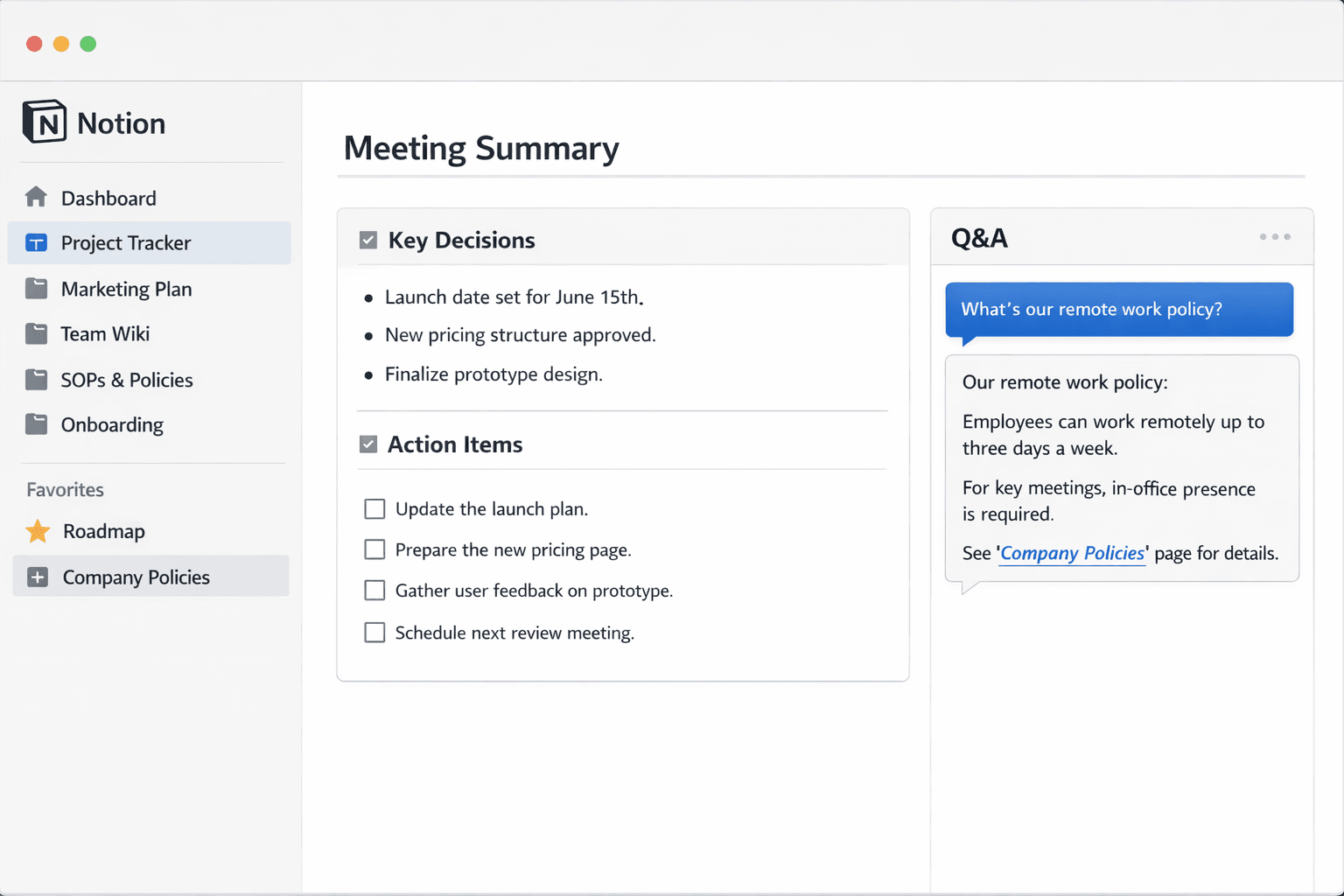
Meeting notes are one of the strongest use cases for Notion AI. Small teams often depend on meetings to make decisions, but the output of those meetings is frequently messy.
Someone writes a few notes. Someone else remembers a decision differently. Action items are mixed with discussion. Follow-ups are not assigned. A week later, the team has to ask what was agreed.
Notion AI can help summarize meeting notes into decisions, action items, open questions, and next steps.
This is especially valuable for async teams. Not everyone can attend every meeting. A clear summary helps teammates catch up quickly without scheduling another call.
A useful AI-generated meeting summary should include:.
Meeting purpose.
Key decisions.
Action items.
Owners.
Deadlines.
Open questions.
Risks.
Follow-up topics.
Important context.
The most reliable results come from structured notes. Teams should use a simple meeting template with sections such as:.
Context.
Discussion.
Decisions.
Action Items.
Open Questions.
Risks.
Next Steps.
When the notes are organized this way, AI has clearer signals. It can summarize what happened without guessing what was decided.
This matters because meeting summaries can create risk if they misrepresent the conversation. AI may treat a discussion point as a decision. It may assign ownership incorrectly. It may make an unresolved topic sound final.
The safest rule is: AI summarizes, humans confirm.
For small teams, this workflow can reduce meetings and repeated explanations. A teammate can read a five-minute summary instead of asking for a separate catch-up.
3. Workspace Q&A and Enterprise Search
Workspace Q&A is one of the most strategic Notion AI features. It helps users ask questions and find answers from existing workspace content.
For example, a team member might ask:.
What did we decide about pricing?
Where is the onboarding checklist?
What is our refund policy?
What are the launch requirements?
What is the current brand voice?
Who owns the support process?
What did we agree in the last roadmap meeting?
This can reduce the constant “Where is that doc?” problem.
For small teams, this is especially useful because interruptions are expensive. When one person asks a question, someone else has to stop work and answer. If that happens many times per week, it becomes a real productivity drain.
Workspace Q&A helps teams self-serve answers.
However, this feature depends heavily on workspace hygiene. If there are several duplicate pages with different answers, AI may surface a plausible answer that is not the official one. If pages are poorly named, outdated, or disconnected, results may be weaker.
The solution is to maintain canonical pages.
A small team should create a short list of trusted pages such as:.
Company Home.
Roadmap.
Pricing.
Brand Voice.
Support Policy.
Product Decisions.
Onboarding Hub.
SOP Library.
Customer FAQ.
Content Guidelines.
Each page should have an owner and should be updated regularly. Teams should link to these canonical pages often.
When the workspace has clear sources of truth, AI answers become more useful and easier to trust.
4. AI Meeting Notes
Notion AI also includes AI Meeting Notes for teams that want help capturing and organizing meeting discussions. This is useful because note-taking can distract people from the conversation. When someone is focused on writing everything down, they may miss important context.
AI Meeting Notes can help transcribe, summarize, and organize meeting content. For small teams, this can improve follow-through after calls.
This is useful for:.
Team syncs.
Sales calls.
Customer interviews.
Product reviews.
Planning sessions.
Hiring discussions.
Retrospectives.
Incident reviews.
Partner calls.
Founder meetings.
A strong meeting notes workflow should produce more than a transcript. The real value is the structured output after the meeting.
The team should look for:.
Summary.
Decisions.
Action items.
Owners.
Deadlines.
Open questions.
Risks.
Follow-up topics.
Useful quotes or insights.
For customer interviews, this can be especially powerful. Instead of losing important feedback in a transcript, the team can turn the conversation into themes, pain points, feature requests, and follow-up actions.
For planning meetings, it can help preserve decisions and next steps.
However, meeting notes still require review. AI may mishear names, miss context, or summarize a sensitive topic too broadly. A human should check important notes before sharing them widely or using them as an official record.
The best practice is to assign a meeting owner. That person reviews the AI notes, cleans up decisions, confirms action items, and links the page to the relevant project.
5. Template Acceleration for SOPs and Onboarding
Small teams often delay SOPs because they feel time-consuming. Everyone agrees documentation is important, but writing a process from scratch is slow.
Notion AI can help create the first version of SOPs, checklists, policies, and onboarding pages.
This is useful for:.
Employee onboarding.
Client onboarding.
Customer support processes.
Content publishing.
Product release checklists.
Incident response.
Sales handoffs.
Hiring workflows.
Internal tool setup.
Vendor onboarding.
A strong SOP should include:.
Purpose.
Scope.
Owner.
When to use it.
Required inputs.
Step-by-step process.
Exceptions.
Escalation path.
Definition of done.
Related pages.
Common mistakes.
AI can draft this structure quickly. The team can then fill in real examples, internal rules, edge cases, screenshots, and approval requirements.
This is important because generic SOPs are not enough. A process doc should reflect how the team actually works. If it does not include real exceptions, it will not help when problems happen.
For onboarding, Notion AI can help create checklists, role-specific learning paths, policy pages, and FAQ sections. This can reduce repeated explanations and help new team members become productive faster.
The best approach is to create a few standard templates:.
Meeting notes template.
SOP template.
Project brief template.
Onboarding checklist.
Decision log.
Customer interview template.
Retrospective template.
Launch checklist.
Once these templates exist, AI can help fill them faster and more consistently.
6. Database-Friendly Workflows
Notion databases are useful for small teams that need lightweight systems without a full project management platform. Teams can use databases for content calendars, project trackers, CRM-style lists, product feedback, bug logs, onboarding tasks, and SOP libraries.
Notion AI can support these database workflows by helping generate summaries, descriptions, status updates, and structured content.
For example, a content calendar database may include:.
Topic.
Owner.
Status.
Publish date.
Keyword.
Brief.
Draft link.
Channel.
Notes.
AI can help generate a draft brief, summarize the article goal, or rewrite the description.
A product feedback database may include:.
Customer.
Feedback type.
Product area.
Priority.
Summary.
Source.
Status.
Next action.
AI can help summarize feedback and extract themes.
An SOP database may include:.
Process name.
Owner.
Department.
Last updated.
Status.
Related tools.
Summary.
AI can help create concise descriptions and update summaries.
The key is consistency. Databases work best when properties are clear and maintained. If every database item uses different naming conventions and missing fields, AI output becomes less dependable.
Small teams should use a limited set of properties that actually matter. Too many fields create friction. Too few fields reduce context.
A good database should be easy for humans to maintain and clear enough for AI to understand.
7. Research Mode and Long-Form Knowledge Work
Notion AI also supports deeper research and report-style workflows. This can help teams that need to create analysis, internal reports, competitive research, planning docs, or strategic summaries.
For small teams, this is useful because deep research often competes with daily execution. A founder, marketer, product lead, or operations manager may need a report but may not have time to start from scratch.
Notion AI can help create a structured first version.
Useful research outputs include:.
Competitive analysis.
Market overview.
Customer research summary.
Product planning report.
Internal strategy memo.
Feature comparison.
Vendor evaluation.
Campaign analysis.
Postmortem report.
Quarterly planning brief.
However, long-form AI research must be reviewed carefully. It should not replace source checking, expert judgment, or business context. AI can help organize and draft, but the team should verify claims, update examples, and add internal knowledge.
For internal reports, Notion AI is most useful when the workspace already contains related pages and databases. It can help connect existing context and turn it into a more readable structure.
The best workflow is:.
Define the question.
Identify source pages.
Ask AI to create a draft report.
Review for accuracy.
Add internal examples.
Link sources and related pages.
Edit for tone and decision value.
This makes AI useful without treating it as a replacement for thinking.
Main Benefits of Notion AI
Faster First Drafts
The biggest benefit is speed. Notion AI helps teams create a starting point quickly. This matters because many documents do not fail in the editing stage. They fail because nobody starts them.
AI can help create version one of a brief, SOP, announcement, FAQ, or report. The team can then improve it.
This reduces blank-page friction.
Better Meeting Follow-Up
Meeting notes become more useful when they turn into decisions and action items. Notion AI can help convert long notes into structured summaries.
This improves accountability and helps async teammates catch up faster.
Fewer Repeated Questions
Workspace Q&A can reduce interruptions. If team members can find answers inside Notion, they do not need to ask the same questions repeatedly.
This is especially helpful for onboarding, policies, product decisions, and internal processes.
Stronger Documentation Habits
AI can make documentation easier to create and maintain. When writing an SOP or onboarding page becomes faster, teams are more likely to document work.
This helps knowledge stay inside the company instead of inside one person’s head.
Less App Switching
Because AI works inside Notion, teams can draft, edit, summarize, and organize in one place. This reduces the need to move information between separate tools.
Less switching often means faster execution.
Better Async Collaboration
Small teams often work across schedules, time zones, or focus blocks. Summaries and Q&A make async work easier because teammates can catch up without another meeting.
More Consistent Templates
AI works better when teams use templates. Over time, this can encourage better structure in meeting notes, project pages, SOPs, and decision logs.
Limitations of Notion AI
It Cannot Fix a Chaotic Workspace
Notion AI depends on the quality of the workspace. If pages are duplicated, outdated, unclear, or poorly named, AI output becomes less reliable.
AI can surface information, but it cannot decide which duplicate page is correct unless the team creates a clear source of truth.
Drafts Can Sound Generic
AI-generated writing can be polished but empty. It may lack examples, metrics, screenshots, decisions, constraints, and team-specific details.
This is why human editing is necessary.
Q&A Depends on Workspace Hygiene
Workspace answers are only useful when the workspace contains reliable information. If Notion is not updated, AI may provide outdated or incomplete guidance.
Sensitive Content Needs Review
External content, customer-facing messaging, legal information, pricing, HR topics, and company policies should always be reviewed by a human.
AI can help draft, but the team owns accuracy.
It May Encourage Over-Documentation
AI makes it easy to generate long documents. That can create clutter if teams publish too many pages without ownership or purpose.
Small teams should keep documentation useful, not excessive.
Best Practices for Using Notion AI
Create Canonical Pages
Every important topic should have one official page. This reduces confusion and improves workspace Q&A.
Useful canonical pages include:.
Roadmap.
Pricing.
Support Policy.
Brand Voice.
Onboarding Hub.
Product Decisions.
SOP Library.
Meeting Notes Index.
Company Handbook.
Customer FAQ.
Standardize Templates
Templates help AI produce better outputs. Small teams should create simple templates for recurring work.
Good templates include:.
Meeting notes.
Project brief.
SOP.
Decision log.
Customer interview.
Weekly update.
Retrospective.
Onboarding checklist.
Assign Page Owners
Important pages should have owners. A page owner is responsible for keeping the content accurate and updated.
This improves trust in the workspace.
Review External Content
Do not publish AI-generated external content without human review. This includes blog posts, customer emails, help docs, sales materials, and policy pages.
Use AI as a Scaffold
Treat AI output as a starting structure. Add real examples, screenshots, metrics, constraints, and decisions before publishing.
Clean Duplicate Pages
Duplicate pages weaken AI retrieval. Teams should archive old pages or clearly mark them as outdated.
Keep Permissions Clean
Workspace Q&A and search depend on permissions. Teams should make sure sensitive pages are only visible to the right people.
Best Use Cases by Team
Founders and Small Business Owners
Founders can use Notion AI to draft internal updates, summarize planning notes, create SOPs, answer workspace questions, and prepare strategy docs.
This saves time and reduces repeated communication.
Product Teams
Product teams can use AI for product specs, customer feedback summaries, roadmap notes, research reports, and decision logs.
AI can help create a first draft, but product decisions should remain human-owned.
Marketing Teams
Marketing teams can use Notion AI for content briefs, campaign plans, brand voice pages, editorial calendars, and messaging drafts.
AI can speed up drafting, but marketing teams should add specific examples, audience insights, and positioning.
Operations Teams
Operations teams can use AI for SOPs, onboarding checklists, internal policies, meeting summaries, and process documentation.
This helps make knowledge reusable.
Customer Support Teams
Support teams can use Notion AI to summarize customer feedback, draft help center content, create internal support policies, and find answers in knowledge bases.
Human review is important for customer-facing content.
HR and People Teams
People teams can use AI for onboarding pages, internal FAQs, policy drafts, meeting notes, and employee program documentation.
Because HR information can be sensitive, permissions and review are important.
Agencies and Client Teams
Agencies can use Notion AI to draft client briefs, summarize meetings, create project pages, and produce status updates.
Client-facing content should always be reviewed before sharing.
Workflow Examples
Example 1: Meeting Notes to Action Items
A team runs a weekly planning meeting and takes notes in Notion.
After the meeting, Notion AI summarizes key decisions, action items, owners, and open questions.
The meeting owner reviews the summary, fixes any mistakes, and links action items to the project page.
This reduces follow-up confusion.
Example 2: SOP Drafting
An operations lead needs to document the client onboarding process.
They write a few bullet points and ask AI to create an SOP draft.
The AI creates sections for purpose, scope, steps, exceptions, escalation, and definition of done.
The team adds screenshots, internal rules, and real examples.
This turns undocumented knowledge into a reusable process.
Example 3: Workspace Q&A
A new employee wants to know the company’s refund policy.
Instead of asking a teammate, they ask Notion AI and review the relevant policy page.
This saves time and improves onboarding.
Example 4: Product Brief Draft
A product manager has rough discovery notes.
AI turns the notes into a draft product brief with problem, user impact, scope, non-goals, open questions, and success metrics.
The product manager edits the draft and adds real customer examples.
Example 5: Content Calendar Support
A marketing team uses a Notion database for content planning.
AI helps generate article briefs, summarize content goals, and rewrite descriptions for clarity.
The editor reviews each brief before assigning the draft.
Example 6: Research Report
A founder needs a competitor overview.
AI helps create a structured research draft. The founder reviews the claims, adds internal insight, and links relevant sources.
This speeds up analysis without replacing judgment.
How to Measure ROI
The value of Notion AI should be measured by time saved and quality improved.
Useful questions include:.
How long does it take to draft SOPs?
How much time is spent summarizing meetings?
How often do teammates ask where a doc is?
How long does onboarding take?
How often are decisions repeated because nobody finds the old one?
How much time is spent writing internal updates?
How many documents remain unfinished?
Teams can track:.
Time saved on meeting summaries.
Reduction in repeated questions.
Faster onboarding.
More completed SOPs.
Fewer follow-up meetings.
Faster first drafts.
Improved documentation quality.
The strongest ROI usually appears in repeated workflows. If AI saves time every week on meeting summaries, onboarding docs, SOPs, or Q&A, the value becomes clear.
Security and Governance
Notion workspaces may contain sensitive information. This can include customer data, employee details, financial information, strategy, pricing, product plans, vendor agreements, and internal policies.
Small teams should use simple governance rules.
Good rules include:.
Review external content before publishing.
Keep sensitive pages permissioned correctly.
Assign owners to important pages.
Archive outdated duplicate pages.
Verify AI answers against source pages.
Use canonical pages for important policies.
Do not treat AI output as final without review.
Keep customer and HR information especially protected.
The goal is not to slow down the team. The goal is to keep trust high while using AI to move faster.
Pros and Cons
Pros
Notion AI helps teams draft documents faster.
It can summarize meeting notes and long pages.
It supports workspace Q&A and knowledge retrieval.
It reduces app switching.
It can help create SOPs and onboarding materials.
It supports async collaboration.
It can help generate templates and structured pages.
It can improve internal documentation habits.
It helps small teams reduce repeated questions.
It works inside the workspace teams already use.
Cons
Notion AI depends on workspace structure.
It can produce generic drafts.
It may surface non-canonical answers if pages are duplicated.
It requires human review for important content.
It does not replace page ownership.
It can amplify workspace chaos if the team has poor documentation habits.
It may encourage too many unnecessary pages.
It is less useful when Notion is not the team’s source of truth.
Is Notion AI Worth It?
Notion AI is worth it for small teams that already use Notion as a central workspace and regularly spend time drafting documents, summarizing meetings, creating SOPs, answering repeated questions, or searching for internal context.
The strongest value appears when Notion is already the place where the team works. If project pages, meeting notes, policies, onboarding docs, and databases live in Notion, AI can make those resources more useful.
It is especially valuable for teams that want to reduce meetings, improve async collaboration, and speed up documentation.
However, Notion AI may disappoint teams with chaotic workspaces. If pages are duplicated, templates are inconsistent, and nobody owns key documents, AI will not solve the root problem.
The best decision rule is simple. If Notion is already your source of truth, AI can help you use that truth faster. If Notion is not yet organized, clean the workspace first.
Final Verdict
The main takeaway from this Notion AI review is that Notion AI can be a practical productivity multiplier for small teams.
Its best use cases are first drafts, meeting summaries, workspace Q&A, SOP creation, onboarding docs, database support, and research workflows. These are repeated tasks that small teams often struggle to maintain because everyone is already busy.
The biggest benefit is speed-to-usable. AI helps teams move from rough notes to editable drafts, from long meetings to action items, and from scattered knowledge to faster answers.
However, AI should not replace judgment. Teams still need clean templates, page owners, canonical pages, permissions, and human review.
For small teams that already live in Notion, the tool is worth testing. It can reduce writing time, improve documentation, support async work, and help teammates find answers faster.
For teams with messy Notion workspaces, the better first step is a cleanup sprint. Standardize templates, archive duplicates, assign owners, and create a few trusted pages. Once that foundation exists, Notion AI becomes much more useful.
AI can make a good workspace faster. It cannot make a messy workspace trustworthy by itself.
FAQ
What is Notion AI?
Notion AI is the AI-powered assistant inside Notion that helps users write, summarize, rewrite, translate, answer questions, create meeting notes, and work more efficiently with workspace content.
What is Notion AI used for?
Notion AI is used for drafting documents, summarizing meeting notes, answering workspace questions, creating SOPs, improving writing, translating content, supporting databases, and generating research drafts.
Is Notion AI useful for small teams?
Yes, it is useful for small teams that use Notion as a central workspace for docs, projects, meeting notes, knowledge bases, and internal processes.
What are the best Notion AI features?
The best features include in-page drafting, rewriting, meeting summaries, workspace Q&A, AI Meeting Notes, template acceleration, database support, and research workflows.
Can Notion AI summarize meeting notes?
Yes, it can summarize meeting notes and help extract decisions, action items, open questions, and next steps.
Can Notion AI answer questions from workspace content?
Yes, it can help answer questions from workspace content. The quality depends on how well the workspace is organized and whether the right pages are current and accessible.
Does Notion AI replace documentation?
No, it does not replace documentation. It helps create and retrieve documentation faster, but teams still need page owners, templates, and canonical pages.
Is Notion AI reliable?
It is reliable for drafts and summaries when the source material is clear. Important answers, external content, and sensitive information should still be reviewed by a human.
Can Notion AI help with SOPs?
Yes, it can draft SOP structures quickly. Teams should add real examples, exceptions, screenshots, escalation paths, and internal rules before publishing.
Is Notion AI good for onboarding?
Yes, it can help create onboarding checklists, FAQs, role-specific learning paths, and internal knowledge pages.
What are the risks of Notion AI?
The main risks are generic drafts, incorrect summaries, non-canonical answers, overreliance on AI, and weak results from messy workspace structure.
How can teams use Notion AI safely?
Teams can use it safely by reviewing important outputs, creating canonical pages, assigning page owners, cleaning duplicate pages, standardizing templates, and managing permissions carefully.
Is Notion AI worth it?
Notion AI Review requires clear execution standards and regular review. Notion AI is worth it if the team already uses Notion regularly and wants to save time on drafting, meeting summaries, SOPs, onboarding, and workspace Q&A.
What should teams fix before using Notion AI?
Teams should fix duplicate pages, unclear templates, messy permissions, outdated docs, and missing page ownership before relying heavily on AI.
Notion AI review remains a practical priority. Notion AI review remains a practical priority. Notion AI review remains a practical priority. Notion AI review remains a practical priority. Notion AI review remains a practical priority. Notion AI review remains a practical priority. Notion AI review remains a practical priority. Notion AI review remains a practical priority. Notion AI review remains a practical priority. Notion AI review remains a practical priority. Notion AI review remains a practical priority. Notion AI review remains a practical priority. Notion AI review remains a practical priority. Notion AI review remains a practical priority. Notion AI review remains a practical priority.
Notion AI review remains a practical priority. Notion AI review remains a practical priority. Notion AI review remains a practical priority. Notion AI review remains a practical priority. Notion AI review remains a practical priority. Notion AI review remains a practical priority. Notion AI review remains a practical priority. Notion AI review remains a practical priority. Notion AI review remains a practical priority. Notion AI review remains a practical priority. Notion AI review remains a practical priority. Notion AI review remains a practical priority. Notion AI review remains a practical priority. Notion AI review remains a practical priority. Notion AI review remains a practical priority.
Related articles
Notion AI review remains a practical priority. Notion AI review remains a practical priority.
Notion AI review matters in practical implementation. Notion AI review matters in practical implementation. Notion AI review matters in practical implementation. Notion AI review matters in practical implementation. Notion AI review matters in practical implementation. Notion AI review matters in practical implementation.
seo-refresh:1781954212 -->