

Slack AI Review: Summaries, Search & Less Context Switching (2026)
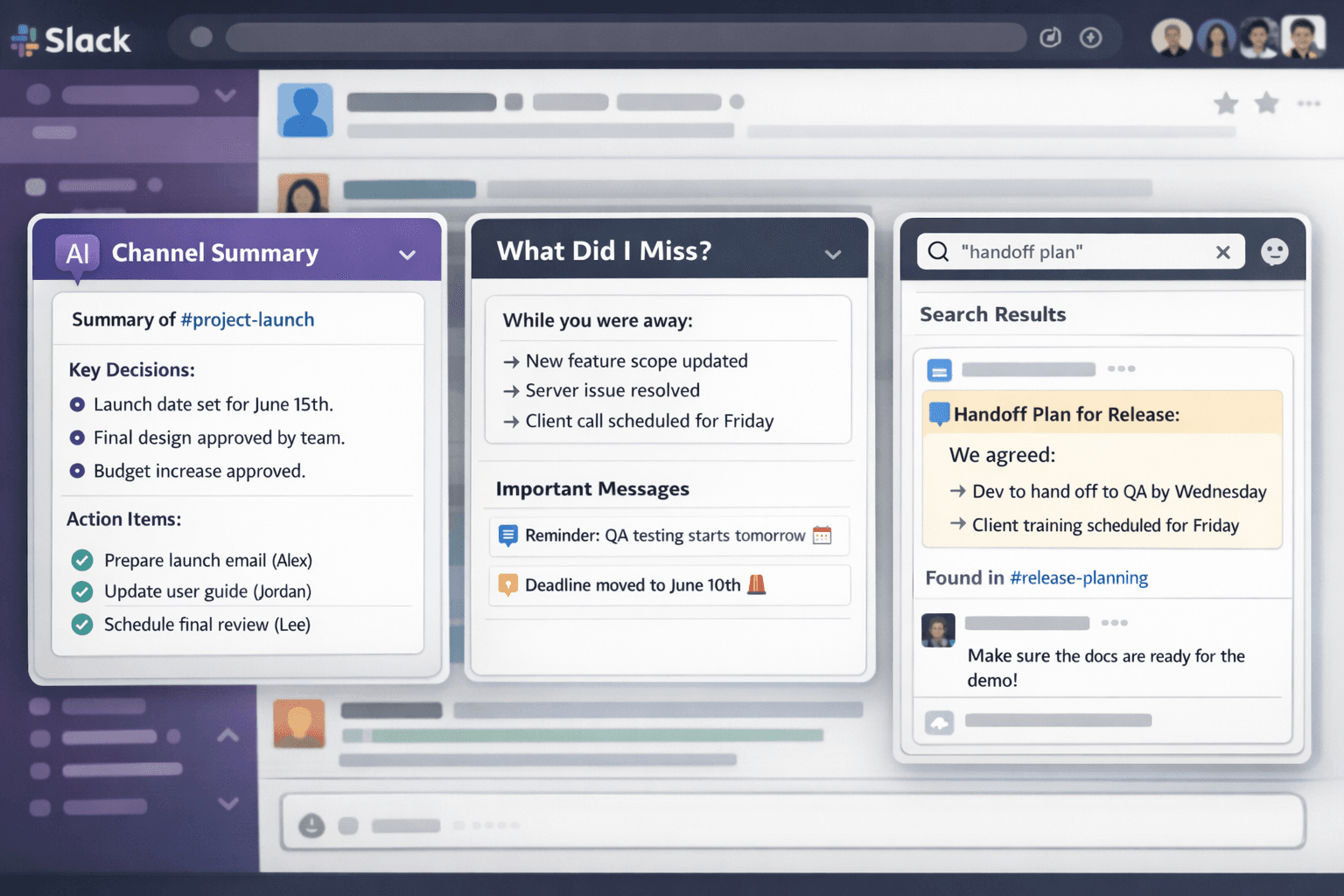
Slack AI Review… Slack solved the email problem-and created a new one: too many messages, too many channels, and too much context trapped in scrolling history. That’s why Slack AI features are so appealing. The core promise isn’t “AI that writes.” It’s AI that helps you keep up without living in Slack all day: summaries that replace catch-up marathons, smarter search that finds the right answer quickly, and automation that reduces repetitive coordination work.For teams that operate in Slack-support, product, engineering, marketing, operations-the cost of missed context is real. People make decisions in threads, share updates in channels, and leave crucial details in quick messages that never make it into documentation. Slack AI tries to bridge that gap by surfacing what matters when you need it, so time zones and busy schedules don’t punish anyone.This review focuses on the practical reality: which Slack AI features actually reduce noise, how reliable they are, and what workflows benefit most. The big takeaway is that Slack AI can deliver meaningful value when paired with good channel hygiene and clear norms. If your Slack is a dumping ground, AI will still summarize the chaos-but it won’t automatically create clarity.
Top FeaturesSlack AI features are most valuable for teams fighting information overload and context loss. These are the capabilities that can change day-to-day productivity.Channel and thread summaries: Get a digest of what happened, key decisions, and action items without reading every message.Catch-up experiences: Quickly understand what you missed during off-hours or while focused on deep work.Smarter search and answers: Find relevant messages and references faster, reducing repeated questions like “Where’s the latest doc?”Writing and rewrite assistance: Draft or polish messages for clarity and tone, especially useful for cross-functional communication.Automation support: Combine Slack workflows with AI-generated summaries or structured outputs for repeatable processes.Knowledge surfacing: Help connect conversations to shared understanding by making key info easier to retrieve.The highest ROI features are summaries and better retrieval. In many teams, a single “What did I miss?” summary can save 20-30 minutes per day. Over a month, that’s real time returned. Search improvements reduce interruptions: fewer pings, fewer repeated explanations, less context re-sent.To maximize impact, teams should standardize channel purpose and naming, and encourage decisions to be written clearly in threads (not just emoji reactions). AI is only as useful as the clarity of the source material it’s summarizing.
Slack AI is most impactful when it reduces the two biggest Slack taxes: catching up and finding answers.Summaries: the catch-up killerSummaries are the flagship value. In busy channels, reading every message is impossible. A good summary compresses noise into signal: decisions, owners, blockers, and next steps. This is especially useful across time zones and in roles that need broad awareness (team leads, support managers, program owners). The primary risk is nuance loss: a summary may miss the “why,” or collapse unresolved debates into a single narrative. Teams should treat summaries as an index, then open the relevant threads for critical context.Search: fewer interruptionsSlack search has always been useful, but it can still feel like spelunking. AI-driven retrieval can reduce time to answer by pointing you to the most relevant thread or message. This decreases “tribal knowledge” dependence-new hires and cross-functional partners can self-serve answers without pinging the same person every time. However, search quality depends on good channel hygiene and consistent linking to canonical docs.Automation: turning Slack into a workflow engineSlack workflows already help route requests (IT, ops, approvals). Pairing that with AI can help generate structured summaries or draft responses. For example, an ops intake workflow can collect a request, then draft a clear ticket summary for review before it gets forwarded to another tool. The caution is governance: keep human review for anything high-stakes or externally visible.Team norms matter more than featuresSlack AI won’t fix a culture of vague messaging. If decisions aren’t clearly written, summaries will be fuzzy. If channels are overloaded with unrelated topics, summaries will reflect that overload. The best teams treat Slack as a communication layer and maintain a small set of canonical docs elsewhere-then use Slack AI to navigate conversations efficiently.Bottom line: Slack AI features can meaningfully reduce information overload and context loss. The best fit is teams with high message volume who want to spend less time reading Slack and more time doing actual work.
Verdict: Slack AI is worth it for organizations with heavy Slack usage where context-switching and catch-up time have become a measurable productivity drain.If summaries consistently save each team member even 10-15 minutes per day, the value compounds quickly-especially for leads who span multiple channels. Smarter search also reduces interruptions and makes onboarding smoother because answers become easier to find.That said, Slack AI is not a substitute for good communication norms. To get the best ROI, define channel purposes, encourage decision logging in threads, and link to canonical documents. With those habits in place, Slack AI becomes a powerful layer that helps teams stay aligned without living in their inbox-because in Slack, the inbox never ends.
Slack AI: Why It Matters in a World of Infinite Messages
Slack solved the email problem-and created a new one: too many messages, too many channels, and too much context trapped in scrolling history. For many teams, Slack isn’t just a chat tool; it’s the coordination layer where decisions happen, updates land, and quick “FYIs” quietly become operational commitments. The cost of missed context is real: duplicated work, repeated questions, and avoidable meetings to “get everyone on the same page.”
That’s the appeal of Slack AI. The core promise is not “AI that writes.” It’s AI that helps you keep up without living in Slack all day. If it can compress noise into signal through summaries, surface the right thread through smarter retrieval, and support lightweight automation that reduces repetitive admin, it can meaningfully reduce the Slack tax: catching up and finding answers.
But Slack AI won’t automatically create clarity from chaos. If channels are dumping grounds and decisions aren’t written clearly, the AI will summarize the mess. The strongest results come when teams pair Slack AI with basic communication hygiene: clear channel purpose, decision logging norms, and links to canonical documents.
Top Slack AI Features That Change Day-to-Day Work
Slack AI features are most valuable for teams fighting information overload and context loss. The highest ROI usually comes from two capabilities: summaries and better retrieval. Writing assistance is nice, but it’s rarely the main reason Slack AI feels transformative.
1) Channel and Thread Summaries
Summaries are the flagship value: a digest of what happened, key decisions, owners, and next actions-without reading every message. This is especially useful across time zones, for team leads spanning multiple channels, and for support or ops teams where shifts hand off ongoing context.
- Best for: high-volume channels, cross-functional coordination, incident or support threads.
- What great summaries include: decisions, open questions, blockers, assigned owners, and next steps.
- Main risk: nuance loss-summaries can compress debate into a single narrative.
2) Catch-Up Experiences: “What Did I Miss?”
Catch-up features are designed for real life: deep work, meetings, travel, and off-hours. Instead of returning to a wall of messages, you get a concise recap. If this reliably saves even 10-20 minutes per day, the cumulative value is substantial over a month.
- Best for: async teams, managers, program owners, anyone in multiple channels.
- Guardrail: treat catch-up as an index; open the key threads for critical context.
3) Smarter Search and Answers
Slack search has always been useful, but it can still feel like spelunking. AI-assisted retrieval aims to reduce time-to-answer by pointing you to the most relevant message or thread. This can reduce interruptions and repeated questions like “Where’s the latest doc?”-especially for onboarding and cross-functional collaboration.
- Best for: decision recall, policy lookup, onboarding, finding the latest owner or status.
- Main dependency: channel hygiene and consistent linking to canonical docs.
4) Writing and Rewrite Assistance
While not the highest ROI, rewriting can improve cross-functional communication: concise for executives, clearer for partners, or more structured for requests. This reduces misinterpretations and follow-up questions.
- Best for: stakeholder updates, sensitive messages, structured handoffs.
- Guardrail: avoid auto-sending; review anything high-stakes or external-facing.
5) Automation Support With Slack Workflows
Slack workflows already route requests (IT, ops, approvals). Pairing them with AI can generate structured summaries, draft responses, or convert raw requests into ticket-ready descriptions for review. This is especially powerful for operations teams that want consistent intake without extra admin.
- Best for: ops intake, support escalation, approvals, incident coordination.
- Governance caution: keep human review for anything that creates commitments or external outputs.
How Slack AI Reduces the Two Biggest Slack Taxes
Most teams don’t need more messages. They need faster comprehension and better retrieval. Slack AI is most impactful when it reduces two recurring costs: catching up and finding answers.
Summaries: Compressing Noise Into Signal
In busy channels, reading every message is impossible. A good summary turns chaos into a skimmable structure: what happened, what changed, and what needs action. The best summaries behave like a well-written meeting note: they separate decision from discussion and highlight ownership.
The primary risk is that summaries can flatten nuance. They may omit the “why,” miss dissenting opinions, or misread an unresolved debate as a conclusion. The right usage pattern is to treat summaries as a navigation layer: use them to locate the key threads, then open those threads for high-stakes decisions.
Search: Fewer Interruptions, Better Self-Serve Answers
Slack is often where tribal knowledge lives. When search gets better, two things happen: people interrupt each other less, and onboarding becomes smoother because new hires can find context without asking the same questions repeatedly. But retrieval quality depends on a critical assumption: the information exists in a findable form.
That means teams need consistent names, stable channel purpose, and links to canonical pages. If critical info is scattered across multiple channels with no consistent vocabulary, the AI may still retrieve something plausible but not authoritative.
Reliability and Trust: What Slack AI Gets Right (and Where It Can Mislead)
Slack AI is strongest when it works with well-structured signals: clearly stated decisions, explicit owners, and messages that contain concrete details. It becomes less reliable when the source material is vague, overloaded, or full of implicit context.
Where It’s Generally Trustworthy
- Thread compression: summarizing a long discussion into key points when decisions are clearly written.
- Catch-up recaps: highlighting major themes and notable changes across a channel.
- Retrieval acceleration: pointing you to the likely relevant thread faster than manual search.
Where It Needs Human Verification
- Decision accuracy: if the thread contains debate, AI may present one view as the conclusion.
- Owner attribution: if owners are implied rather than explicit, AI can misattribute responsibility.
- Nuance and “why”: summaries can lose rationale, which is often the key to correct execution.
- Multiple sources of truth: if there are duplicate docs and mixed channel topics, AI may surface the wrong reference.
The safest operating rule is simple: AI summarizes, humans confirm for anything that changes commitments, scope, customer impact, or compliance posture.
The Hidden Multiplier: Channel Hygiene and Team Norms
Slack AI is not a substitute for communication discipline. It amplifies what’s already there. If your Slack is structured, AI makes it easier to navigate. If your Slack is chaotic, AI will faithfully summarize the chaos.
Channel Hygiene That Makes AI Dramatically Better
- Clear channel purpose: one channel should have one primary reason to exist.
- Consistent naming: predictable channel names make retrieval and routing easier.
- Thread discipline: decisions and action items should live in threads, not scattered replies.
- Pin or reference canonical docs: link to the authoritative page instead of re-explaining in chat.
- Write decisions explicitly: “Decision: we will X by date Y. Owner: Z.”
Decision Logging: The Single Highest-Leverage Habit
If your team wants Slack AI summaries to be reliable, adopt a lightweight decision format. A single message in a thread can anchor the summary:
- Decision: what was decided
- Rationale: short “why” (optional but high value)
- Owner: who is accountable
- Next step: what happens next
- Date: when it matters
This reduces ambiguity for humans and gives the AI a clear “source of truth” inside the conversation.
High-ROI Workflows by Team Type
Slack AI tends to deliver the strongest ROI for teams with high message volume, heavy cross-functional coordination, and frequent context switching.
Support Teams
Support teams benefit from faster catch-up and better retrieval. Summaries help shift handoffs, while improved search reduces repeated escalations and helps newer agents find prior resolutions quickly. The key is consistent tagging or channel structure so issue patterns are searchable.
Product and Engineering Teams
Product and engineering teams often make micro-decisions in threads. Summaries reduce the cost of reopening old topics, and better search helps people find prior decisions, tradeoffs, and constraints. The biggest risk is nuance loss; critical decisions should still be validated in source threads or documented in canonical specs.
Marketing and GTM Teams
Marketing teams often juggle many concurrent workstreams, making catch-up valuable. Rewriting helps tailor updates for different stakeholders. Summaries help keep launch coordination visible without scheduling extra alignment meetings.
Operations Teams
Ops teams benefit from workflow automation patterns: collecting requests, summarizing them into structured intake, and routing them consistently. AI can reduce admin load, but governance matters-keep review steps for anything that creates commitments.
Governance and Safety: Keeping Automation From Creating New Risk
The biggest operational risk is accidental authority: AI-generated text being treated as an official decision or commitment. Teams should keep governance lightweight but explicit, especially when outputs affect customers, compliance, or finance.
- External-facing rule: no AI-generated external content without human review.
- High-stakes channels: require explicit decision messages and owners.
- Workflow approvals: AI can draft intake summaries, but humans should approve before forwarding to ticketing systems.
- Canonical documentation: link decisions to a durable doc when they matter long-term.
The goal is not to slow down the team. The goal is to keep Slack AI as a speed tool while preserving trust in the system.
Verdict: Is Slack AI Worth It?
Slack AI is worth it for organizations with heavy Slack usage where context switching and catch-up time have become a measurable productivity drain. The best ROI comes from summaries and improved retrieval. If summaries consistently save each team member even 10-15 minutes per day, the value compounds quickly-especially for leads who span multiple channels.
However, Slack AI is not a substitute for communication norms. To get the best results, define channel purposes, encourage explicit decision logging in threads, and link to canonical documents. With those habits in place, Slack AI becomes a powerful layer that helps teams stay aligned without living in their inbox-because in Slack, the inbox never ends.
FAQ: Slack AI
What is the highest ROI feature in Slack AI?
Channel and thread summaries. They reduce catch-up time and help team leads and async teams stay aligned without reading every message.
How reliable are Slack AI summaries?
They are reliable as an index to what happened, especially when decisions and owners are written explicitly. For critical decisions, use the summary to find the key thread and verify details in the source messages.
Does Slack AI reduce interruptions?
Yes, mainly through better retrieval. When people can find answers faster, they ask fewer repeated questions and rely less on tribal knowledge.
Will Slack AI fix a chaotic Slack workspace?
No. It will summarize the chaos. The best results come with clear channel purpose, thread discipline, and explicit decision logging.
Can Slack AI help with workflows and automation?
Yes. Pairing AI with Slack workflows can create structured intake summaries and draft responses, especially for ops and support. Keep human review for high-stakes outputs.
What team habits improve Slack AI performance the most?
Explicit decision messages with owners and next steps, consistent channel naming, and linking to canonical documents instead of re-explaining in chat.
When is Slack AI worth paying for?
When Slack message volume is high and catch-up is a daily productivity drain. If summaries save even a small amount of time per person per day, the value compounds quickly across the organization.