

Slack AI Review: Summaries, Search & Less Context Switching (2026)
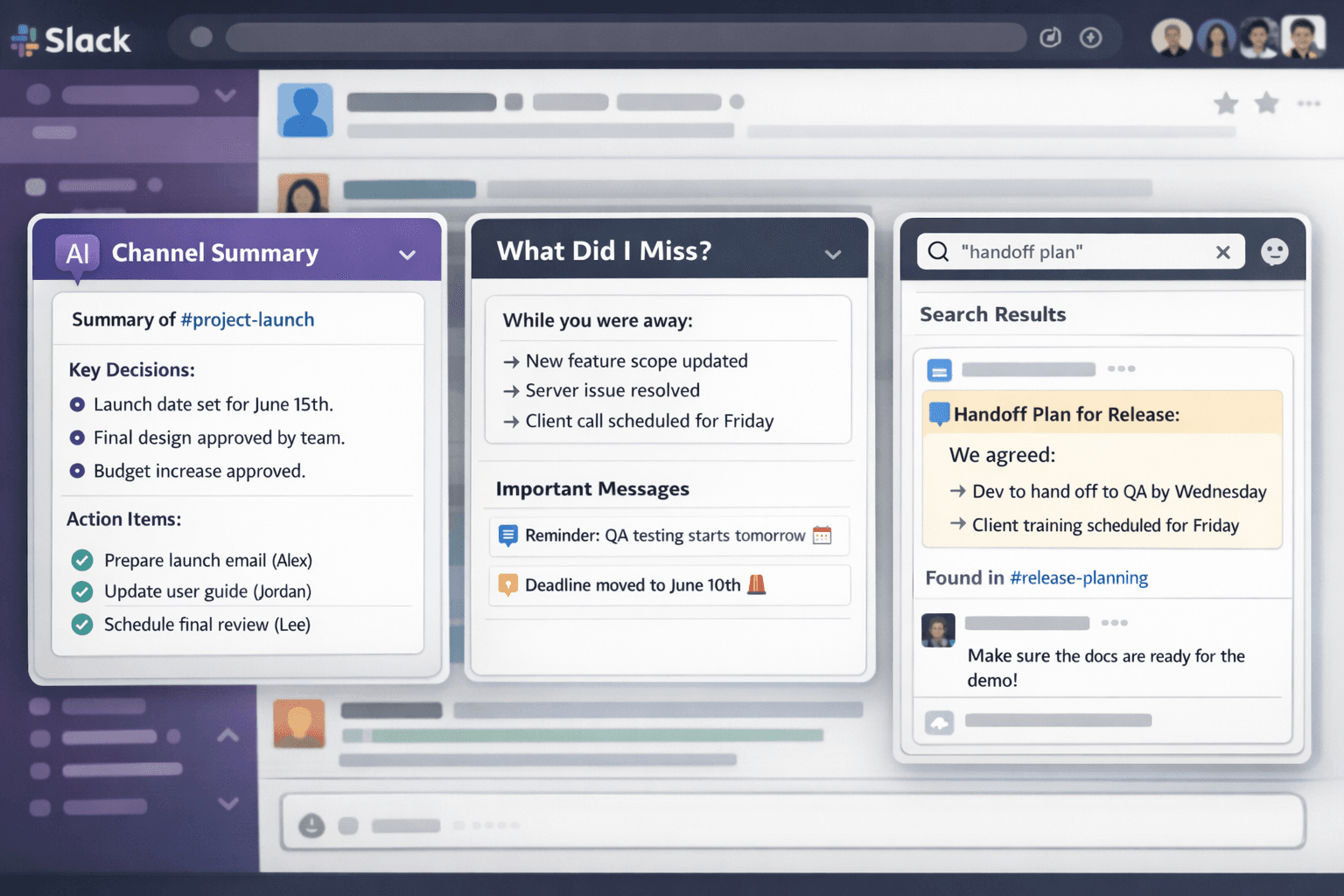
Slack AI Review: Features, Benefits, Limitations, and Is It Worth It?
Slack has become one of the most important communication tools for modern teams. It replaced many internal emails, made real-time collaboration easier, and helped remote and hybrid teams stay connected. However, as Slack usage grows, a new problem appears: too many channels, too many unread messages, too many long threads, and too much important context hidden inside conversations.
For many companies, Slack is no longer just a chat app. It is where teams discuss product decisions, share customer updates, coordinate projects, ask for approvals, report incidents, and solve problems. That makes Slack extremely useful, but it also creates information overload. A person may return from a meeting, a day off, or a focused work session and find hundreds of unread messages waiting for them.
Slack AI is designed to reduce that problem.
The main promise of Slack AI is simple: it helps people understand what matters without forcing them to read everything manually. Instead of scrolling through long conversations, users can summarize channels and threads, ask questions in natural language, review recaps, take huddle notes, and use AI-assisted workflows to reduce repetitive coordination work.
This Slack AI review looks at the platform from a practical business perspective. It explains what Slack AI does, which features matter most, where it performs well, where it still needs human oversight, and what kind of teams are most likely to benefit from it.
The short answer is that Slack AI can be very useful for organizations with heavy Slack usage. It is especially valuable for teams that deal with high message volume, frequent context switching, distributed work, and repeated internal questions. However, Slack AI is not a magic fix for poor communication habits. If channels are messy and decisions are unclear, AI will not automatically create perfect structure. It will mostly summarize the information it can see.
For the best results, Slack AI should be used together with clear channel organization, explicit decision logging, consistent documentation habits, and human review for important outputs.
What Is Slack AI?
Slack AI is a collection of artificial intelligence features built into Slack to help users work faster inside their workspace. These features are designed to summarize conversations, answer questions, generate recaps, support huddle notes, assist with workflow creation, and make company knowledge easier to find.
The most important thing to understand is that Slack AI is not just a writing tool. It is more useful as a context tool. It helps users understand conversations that already happened, locate information that already exists, and reduce the time spent moving through old messages.
For example, a manager can use Slack AI to summarize a busy project channel. A support lead can catch up on an escalation thread. A new employee can ask a question and find relevant workspace information faster. An operations team can use AI-assisted workflows to turn repeated requests into a more structured process.
This makes Slack AI valuable because the real problem inside many workplaces is not a lack of communication. The problem is too much communication without enough structure. Slack AI tries to turn scattered conversations into more usable context.
Still, Slack AI should not be treated as a complete knowledge management system. Important policies, long-term decisions, product specifications, legal information, and customer-facing commitments should still live in reliable documentation. Slack AI can help users find and summarize information, but official records should remain clear, reviewed, and easy to access.
Why Slack AI Matters
The modern workplace has an attention problem. Teams communicate across chat apps, email, project management tools, documents, meetings, and video calls. Slack helps centralize some of that communication, but it also increases the speed and volume of messages.
This creates several common problems. People miss important updates because they cannot read every message. Managers spend too much time catching up across multiple channels. New employees ask repeated questions because previous answers are hard to find. Teams lose decisions inside long threads. Project context becomes scattered across channels, files, and informal discussions. Employees interrupt each other because self-service search is not always easy.
Slack AI matters because it directly targets these problems. Its strongest use cases are not futuristic. They are everyday productivity issues: “What did I miss?”, “What was decided?”, “Where is that document?”, “Who owns this?”, and “What are the next steps?”
When AI can answer those questions quickly, teams save time. The time savings may seem small at first, but they can add up quickly across an organization. Even a few minutes saved per person per day can become meaningful when multiplied across dozens or hundreds of employees.
The value is even higher for roles that need broad visibility. Team leads, program managers, support managers, operations leads, and executives often need awareness across many conversations. Slack AI can help them stay informed without requiring them to monitor every message in real time.
Key Slack AI Features
1. Channel Summaries
Channel summaries are one of the most useful Slack AI features. They allow users to summarize activity in a Slack channel instead of reading every message manually.
This is especially helpful in high-volume channels where updates move quickly. A project channel may include status updates, blockers, decisions, links, questions, and side discussions. Without a summary, catching up can take a long time. With a summary, users can get a faster overview of the most important points.
Channel summaries are useful for project updates, leadership visibility, remote team coordination, cross-functional work, support and incident channels, operations requests, and company announcements.
The best channel summaries help users understand what changed, what decisions were made, what questions remain open, and what actions need attention. This turns Slack from a stream of messages into something closer to a digest.
However, channel summaries also have limitations. They can miss subtle details or reduce a complicated discussion into a simplified version. If a decision is sensitive or high impact, users should still open the original messages and verify the details.
2. Thread Summaries
Thread summaries are another high-value feature. Many important Slack conversations happen inside threads because threads keep replies attached to the original message. But threads can become long, especially when several people discuss a problem, debate options, or coordinate urgent work.
A thread summary helps users understand the conversation without reading every reply. This is useful when joining a discussion late or reviewing an old decision.
Thread summaries are particularly useful for engineering investigations, support escalations, bug discussions, design feedback, approval conversations, policy clarification, and incident response.
The best use of thread summaries is quick orientation. A user can read the summary, understand the main points, then open the original thread if they need deeper context.
The main risk is nuance loss. If a thread includes multiple viewpoints, unresolved disagreement, or conditional decisions, a summary may not fully capture the uncertainty. That is why teams should write clear decision messages inside threads. A simple message like “Decision: We will launch the update on Friday. Owner: Maya. Next step: QA signs off by Thursday” gives both humans and AI a clearer source of truth.
3. Recaps
Recaps help users stay updated on channels they do not want to monitor constantly. This is useful because most people belong to more channels than they can realistically follow in detail.
A recap can give users a periodic overview of what happened in selected channels. This helps them stay informed while reducing interruptions during the workday.
Recaps are useful for low-priority but relevant channels, cross-functional awareness, department updates, leadership visibility, async teams, and remote teams working across time zones.
For example, a marketing manager may not need to read every message in a product engineering channel, but they may still want to know when launch timing changes. A recap can surface important updates without requiring constant monitoring.
Recaps are also helpful for people returning from time away. Instead of reading everything chronologically, they can start with a summary and then investigate the most important threads.
4. AI-Powered Search
AI-powered search is one of the most important Slack AI capabilities because search is central to workplace productivity. Traditional search often requires users to remember exact words, names, dates, or channel locations. If someone does not remember the exact phrase used in a previous discussion, finding the right message can be frustrating.
AI-powered search allows users to ask questions in more natural language. Instead of searching for a specific keyword, a user can ask a question such as:
“What did we decide about the onboarding flow?”
“Who is responsible for the enterprise pricing update?”
“Where is the latest version of the launch plan?”
“What were the main blockers from last week’s incident?”
This can reduce repeated questions and help employees find information independently. It also makes Slack more useful as a workplace knowledge layer.
The biggest limitation is that AI search depends on available and accessible information. If the answer does not exist in Slack, or if the relevant information is unclear, outdated, or spread across many places, the result may not be complete. For that reason, AI search should be seen as a faster path to context, not a guarantee of final truth.
5. Huddle Notes
Slack huddles are often used for quick voice conversations. They are helpful for fast collaboration, but they can create another problem: important points may be discussed verbally and then forgotten.
AI huddle notes help solve this by capturing key takeaways and action items from huddles. This allows participants to focus on the conversation instead of manually taking notes.
Huddle notes are useful for quick project syncs, incident discussions, support escalations, internal standups, decision reviews, and informal planning sessions.
When a huddle ends, notes can help the team remember what was discussed and what needs to happen next. This is especially helpful when not everyone could attend the conversation.
However, huddle notes should still be reviewed. Meeting notes can contain mistakes, incomplete context, or misunderstood action items. For casual internal work, they may be enough. For important decisions, someone should confirm the final version.
6. AI Writing Assistance
Slack AI can also help users write or refine messages. While this may not be the most transformative feature, it is still useful in many everyday situations.
Writing assistance can help make messages clearer, shorter, more professional, more structured, more appropriate for a specific audience, and less likely to cause confusion.
This is useful for cross-functional communication. A technical person may need to explain an issue to a non-technical stakeholder. A manager may need to write a concise update for leadership. A support team member may need to summarize an escalation clearly.
The best way to use AI writing assistance is as a drafting tool. Users should review the message before sending it, especially when the message is sensitive, customer-facing, or related to commitments.
7. Workflow Support
Slack workflows help teams automate repeatable processes. With AI support, workflows can become more useful because they can summarize information, generate structured text, and help users create workflow steps more easily.
This is especially valuable for teams that handle many repeated requests.
Examples include IT support requests, HR questions, operations approvals, customer escalation intake, bug reporting, incident updates, procurement requests, and internal service requests.
For example, an operations team could create a workflow that collects request details from a user, then uses AI to generate a cleaner summary for review. A support team could summarize an escalation before sending it to engineering. A manager could use a workflow to collect weekly updates and turn them into a digest.
Workflow support can save time, but governance matters. AI should not automatically approve requests, make commitments, or send sensitive information without human review. It should organize and draft, while humans remain responsible for final decisions.
Benefits of Slack AI
Faster Catch-Up
The biggest benefit of Slack AI is faster catch-up. Many employees lose time every day reading old messages, checking channels, and trying to understand what happened while they were away. Summaries and recaps reduce that burden.
This is especially helpful for people who work across time zones. A team member in one region may wake up to a full day of messages from another region. Instead of reading everything line by line, they can use AI to identify what matters most.
Faster catch-up also helps employees return from meetings or focused work. In many workplaces, being away from Slack for only two hours can create a long backlog. Slack AI reduces the feeling of being punished for doing deep work.
Less Context Switching
Slack can be distracting because messages arrive throughout the day. Users often jump between channels, threads, files, and direct messages. Slack AI reduces some of this context switching by bringing important information into a shorter, more digestible form.
When people spend less time scanning channels, they can spend more time doing focused work. This matters because productivity is not only about how many messages someone reads. It is also about how much attention they can protect.
By making important updates easier to review, Slack AI helps teams reduce unnecessary movement between conversations.
Better Knowledge Retrieval
AI-powered search improves the ability to find past decisions, documents, and updates. This helps teams reduce repeated questions and avoid unnecessary meetings.
Instead of asking a colleague, “Do you remember what we decided?”, a user may be able to search Slack and find the answer independently. This creates more self-service knowledge access.
Better knowledge retrieval is especially important in growing companies. As teams expand, it becomes harder for everyone to know who has the answer. Slack AI can help reduce dependency on a small number of people who hold most of the context.
Improved Onboarding
New employees often struggle to understand where information lives. They may not know which channels matter, who owns certain topics, or where previous decisions were discussed.
Slack AI can help new employees find context faster. They can ask questions, summarize channels, and review previous discussions more easily. This does not replace onboarding documentation, but it can make the first weeks smoother.
For example, a new product manager joining a team can summarize a project channel to understand recent decisions. A new support agent can search for previous customer issue resolutions. A new engineer can review a technical discussion before asking follow-up questions.
This helps new employees become productive faster.
Better Async Collaboration
Remote and distributed teams depend heavily on asynchronous communication. Slack AI supports async work by helping people catch up when they are not online at the same time.
Instead of requiring everyone to attend every meeting or read every message live, teams can rely more on summaries, recaps, and searchable context.
This is especially useful for global teams. When team members work in different time zones, Slack AI can reduce the disadvantage of not being online when a conversation happened.
Reduced Repeated Questions
Repeated questions are a hidden productivity cost. When information is hard to find, people ask the same questions again and again. That interrupts the people who know the answer and slows down the person asking.
AI search can reduce this by making answers easier to locate. Over time, this can improve team efficiency and reduce dependency on a few knowledge holders.
It can also improve team morale. People are less frustrated when they can find answers quickly, and experts are less interrupted by questions they have already answered several times.
Limitations of Slack AI
It Cannot Fix Chaotic Communication Alone
Slack AI works best when the workspace is already reasonably organized. If channels are full of unrelated topics, if people make vague decisions, and if important information is scattered, AI output will be less reliable.
AI can summarize chaos, but it cannot automatically turn poor communication into perfect knowledge management.
This is one of the most important things to understand before adopting Slack AI. The technology is helpful, but it is not a substitute for team discipline. If people do not write clearly, summaries may be vague. If decisions are only implied, AI may not identify them accurately. If documents are outdated, search may surface information that still needs verification.
It May Miss Important Nuance
Summaries are useful, but they are compressed versions of longer conversations. Important nuance may be lost. This is especially true in discussions involving disagreement, uncertainty, tradeoffs, or sensitive decisions.
For example, a thread may include three possible options, several objections, and a tentative conclusion. A summary might make the conclusion sound more final than it actually was. That can create problems if someone acts on the summary without checking the original discussion.
Users should treat summaries as a guide, not as a replacement for reading the source when accuracy matters.
It Depends on Access and Available Information
AI search can only work with information the user can access. If the information is not available, not connected, or not written clearly, AI may not provide the answer the user needs.
This is a strength from a privacy perspective, but it also means AI is limited by the quality and availability of workspace data.
For example, if the official answer exists only in a private channel the user cannot access, Slack AI should not expose it. If the answer was discussed verbally but never written down, Slack AI cannot reliably find it. If several outdated versions of a document exist, users still need to verify which one is current.
It Requires Human Review
AI-generated notes, summaries, and workflow outputs can contain errors. Human review is necessary for anything high stakes, including customer communication, compliance topics, legal issues, financial approvals, and major project decisions.
This does not mean Slack AI is unsafe. It means teams should use it appropriately. AI is excellent for speeding up review, orientation, and drafting. It should not become the final authority for sensitive work.
It Is Not a Documentation Replacement
Slack is conversational by nature. That makes it useful for collaboration, but not ideal as the only source of truth. Long-term knowledge should still be stored in organized documents, wikis, project management tools, or knowledge bases.
Slack AI helps retrieve context, but it should support documentation rather than replace it.
A healthy team can use Slack for discussion, Slack AI for summaries and discovery, and documentation tools for final decisions. This combination gives teams both speed and reliability.
Best Practices for Using Slack AI
Create Clear Channel Purposes
Each channel should have a clear reason to exist. If a channel is about a product launch, keep it focused on that launch. If it is for support escalations, avoid mixing unrelated team chatter into it.
Clear channel purpose improves both human understanding and AI summaries. It also makes search more reliable because conversations are easier to locate.
A channel without a clear purpose becomes a dumping ground. Once that happens, both people and AI have a harder time separating signal from noise.
Use Consistent Channel Naming
Consistent naming makes it easier to find the right information. For example, teams might use naming patterns like proj-product-launch, team-support, inc-incident-name, ops-requests, or mkt-campaign-name.
This helps users and AI understand where certain topics belong.
Consistent naming also helps new employees. They can understand the workspace faster and know where to look before asking questions.
Write Explicit Decision Messages
Decision logging is one of the most valuable habits for getting better AI output. When a team reaches a decision, write it clearly in the thread or channel.
A simple structure works well:
Decision: What was decided
Owner: Who is responsible
Next step: What happens next
Deadline: When it matters
Reason: Why this decision was made
This reduces ambiguity and makes future summaries more accurate.
The value of decision logging is not only for AI. It also helps humans. When someone returns to a thread months later, they should not have to read every message to understand the final outcome.
Link to Canonical Documents
When information matters long term, link to a trusted document. Do not rely only on a Slack message. A Slack thread can explain the discussion, but the final version should live somewhere stable.
This is especially important for policies, product requirements, launch plans, customer commitments, and technical specifications.
Slack AI can help find the conversation, but the final answer should usually be in a document that the team maintains over time.
Review Important AI Outputs
For low-risk catch-up, AI summaries are usually enough. For important work, review the original source. This is the safest way to use Slack AI: let it guide you to the right information, then confirm details where needed.
Teams should create simple rules for review. For example, internal status updates may not need much verification. Customer-facing statements, legal topics, financial decisions, and compliance issues should always be checked by a human.
Train Teams on When to Use AI
Teams should agree on simple rules for Slack AI. For example, use summaries for catch-up, use AI search before asking repeated questions, use huddle notes for internal meetings, review AI-generated content before sharing externally, and document final decisions outside Slack when they matter long term.
These rules help teams get value without creating confusion.
Without training, some employees may ignore Slack AI completely, while others may trust it too much. A balanced approach works best.
Slack AI Use Cases by Team
Support Teams
Support teams often manage urgent customer issues, escalations, and handoffs. Slack AI can help summarize long escalation threads, find past resolutions, and make shift handoffs clearer.
For example, if a support agent starts a new shift, they can review summaries of active issues instead of reading every message from the previous shift. This saves time and reduces the chance of missing important context.
Slack AI can also help support managers identify patterns. If several customer issues are discussed across channels, summaries and search can help surface recurring problems.
Support teams should still verify customer-impacting details before acting. AI can speed up understanding, but it should not replace careful review in sensitive cases.
Product Teams
Product teams often use Slack to discuss priorities, customer feedback, roadmaps, and launch plans. Slack AI can help product managers summarize discussions, find previous decisions, and keep stakeholders updated.
This is useful because product decisions often involve many people: engineering, design, marketing, sales, support, and leadership. AI summaries can help product managers keep track of cross-functional conversations.
For example, a product manager can summarize a long thread about a feature request, identify the main objections, and find the next step. This helps reduce the time spent reconstructing context.
The best practice is to use Slack AI for context and then document final product decisions in a roadmap, PRD, or project management system.
Engineering Teams
Engineering teams can benefit from thread summaries, incident recaps, and AI search. Technical discussions often become long and detailed. Slack AI can help engineers quickly understand what happened in a thread before diving into the details.
It can also help with incident response by summarizing updates, blockers, and next steps. After an incident, summaries may help create a first draft of what happened, although the final postmortem should still be carefully reviewed.
For engineering teams, the biggest risk is oversimplification. Technical nuance matters. Slack AI can help engineers locate context, but source threads, logs, tickets, and documentation should still be checked before final decisions are made.
Marketing Teams
Marketing teams manage campaigns, launches, approvals, content calendars, and stakeholder feedback. Slack AI can help summarize campaign discussions, rewrite updates, and create clearer cross-functional communication.
For example, a marketer could summarize launch feedback from several threads and turn it into a cleaner update for the wider team. This saves time and reduces confusion.
Marketing teams can also use AI writing support to adapt messages for different audiences. A campaign update for executives may need to be shorter and more strategic, while a team update may include more operational detail.
Operations Teams
Operations teams often deal with repeated processes. Slack AI workflows can help standardize intake, summarize requests, and route information more efficiently.
This is valuable for teams handling approvals, internal service requests, vendor questions, office operations, and process coordination.
For example, an operations request may arrive with incomplete or messy details. An AI-supported workflow can help turn that request into a structured summary before a team member reviews it.
The key is to keep humans in control of approvals and commitments. AI should assist the process, not own the decision.
HR and People Teams
HR teams can use Slack AI to summarize internal questions, support onboarding, and manage recurring processes. AI search may help employees find answers to common questions, while workflow support can improve HR intake.
However, HR teams should be especially careful with privacy, sensitive employee information, and policy accuracy. Official HR guidance should always be verified against approved documentation.
Slack AI can be useful for helping employees navigate information, but it should not become the only way employees receive policy guidance.
Leadership Teams
Leaders need visibility without drowning in details. Slack AI can help leaders review recaps, summarize important channels, and search for context quickly.
This can help executives and managers stay informed about projects, blockers, and organizational updates. However, leaders should avoid making major decisions based only on summaries. For sensitive or strategic topics, they should review the original conversation and official documents.
Slack AI is best for leadership awareness, not final judgment.
Slack AI and Security Considerations
Security and privacy are important when using any workplace AI tool. Slack AI is designed to work within workspace permissions, meaning users should only receive answers based on information they are allowed to access. This is important because Slack often contains sensitive internal discussions, customer information, strategy, and operational details.
Still, organizations should create internal AI usage guidelines. These guidelines should explain what employees can use AI for, what information requires extra caution, and when human review is mandatory.
Recommended governance rules include not using AI output as final approval for high-stakes decisions, reviewing customer-facing or external-facing content before sending, keeping sensitive HR, legal, finance, and compliance information in approved systems, using permissions carefully, maintaining clear documentation for official policies, and treating AI summaries as assistance rather than authority.
Good governance does not need to be complicated. The goal is to help teams move faster while protecting trust, accuracy, and accountability.
Slack AI vs Traditional Slack Search
Traditional Slack search is still useful, especially when users know exactly what they are looking for. If someone remembers a specific keyword, file name, or person, standard search may be enough.
AI search is more useful when the user knows the question but not the exact wording. This is common in real work. People often remember that a decision happened, but they do not remember the channel, date, or phrase used.
Traditional search may work well for a known file name, a specific phrase, a person’s message, or a date-based lookup.
AI search is better for natural-language questions, finding decisions, summarizing context, locating information when keywords are unclear, and understanding a topic across multiple messages.
The best approach is to use both. Traditional search is precise. AI search is better for exploration and context.
Slack AI vs Documentation Tools
Slack AI improves access to conversational knowledge, but it does not replace documentation tools. Documentation tools are still better for official, structured, and long-term knowledge.
Slack is where conversations happen. Documentation is where final knowledge should live.
A healthy team uses Slack for discussion, quick updates, and collaboration. It uses Slack AI for summaries, search, and catch-up. It uses documentation tools for policies, specs, project plans, and official decisions.
If a team relies only on Slack, knowledge can become fragmented. If a team relies only on documentation, collaboration can become slow. The strongest workflow combines live discussion with clear documentation and AI-assisted retrieval.
How to Measure Slack AI ROI
To decide whether Slack AI is worth it, teams should look at practical productivity metrics.
Useful questions include:
How much time do employees spend catching up on Slack each day?
How often do people ask repeated questions?
How long does it take new employees to find internal context?
How many meetings exist mainly to share updates?
How often are decisions lost in threads?
How much time do managers spend scanning channels?
If Slack AI reduces even a portion of these costs, it may provide strong ROI. The value is especially high in large teams or teams with heavy message volume.
Teams can measure Slack AI impact by tracking time saved on catch-up, reduction in repeated questions, faster onboarding, fewer status update meetings, improved handoff quality, faster incident or escalation review, and better employee satisfaction around information overload.
The most realistic ROI comes from small daily savings that compound over time.
Who Should Use Slack AI?
Slack AI is a strong fit for organizations that already use Slack heavily. It is most valuable when Slack contains important daily context and when employees regularly struggle to keep up.
Slack AI is a good fit for medium and large teams, remote and hybrid teams, async teams, support organizations, product and engineering teams, operations teams, fast-moving startups, enterprises with many channels, and managers who need broad visibility.
Slack AI may be less valuable for very small teams with low message volume. If a team only uses a few channels and messages are easy to follow manually, the benefit may be limited. In that case, basic Slack usage and good documentation may be enough.
Pros and Cons of Slack AI
Pros
Slack AI saves time by summarizing long channels and threads. It helps users catch up after meetings, focused work, travel, or time off. It makes workspace knowledge easier to find through natural-language search. It can reduce repeated questions and unnecessary interruptions. It supports remote and async collaboration.
Slack AI can also improve huddle follow-up through AI-generated notes. It helps managers and team leads stay informed across multiple channels. It can support workflow automation for repeated internal processes. It helps new employees find context faster. It improves the usefulness of Slack as a workplace knowledge layer.
Cons
Slack AI can miss nuance in complex conversations. It depends on clear messages and organized channels. It is not a replacement for formal documentation. It still requires human review for important decisions. It may be less useful in low-volume workspaces.
AI search quality depends on the information users can access. Poor channel hygiene can reduce accuracy and usefulness. Teams need governance rules for sensitive information.
Practical Tips Before Rolling Out Slack AI
Before rolling out Slack AI widely, organizations should prepare their workspace. This does not require a major transformation. A few simple habits can make a large difference.
First, review channel structure. Remove or archive unused channels where possible. Clarify the purpose of active channels. Make sure important work has a clear place.
Second, encourage decision logging. Teams should write decisions in a clear format so future summaries and searches are more reliable.
Third, identify which channels are good candidates for recaps. Not every channel needs constant attention. Recaps work best for channels that matter but do not require immediate response.
Fourth, create review rules. Employees should know when AI-generated content needs human verification.
Fifth, connect AI usage to team workflows. Slack AI should solve specific problems, not simply exist as a novelty. Good starting points include catch-up, support handoffs, project summaries, onboarding, and workflow intake.
Common Mistakes to Avoid
Treating AI Summaries as Final Truth
Summaries are useful, but they are still summaries. They should guide users to the right context, not replace verification for important work.
If a summary says a decision was made, users should check the original thread before acting on anything important. This is especially necessary for legal, financial, customer-facing, technical, or strategic decisions.
Ignoring Channel Hygiene
If channels are messy, AI results will be less helpful. Teams should not expect AI to fix poor communication structure by itself.
A workspace with clear channels, consistent naming, and disciplined threads will usually get better results from Slack AI than a workspace where every conversation happens everywhere.
Replacing Documentation With Slack
Slack conversations are not the same as official documentation. Important decisions should still be documented in stable systems.
Slack AI can help surface the conversation that led to a decision, but the final version of that decision should live somewhere durable.
Automating Too Much Too Quickly
AI workflows are powerful, but teams should start with low-risk use cases. High-stakes automation should include review steps.
A good first step is to automate summaries or intake drafts. A risky first step is to let AI approve requests or send external responses without review.
Not Training Employees
Teams need simple guidance. Without shared norms, employees may either underuse Slack AI or rely on it too much.
Training does not need to be complicated. A short internal guide explaining when to use summaries, when to verify, and when to document decisions can make Slack AI much more effective.
Final Verdict: Is Slack AI Worth It?
Slack AI is worth it for teams that rely heavily on Slack and want to reduce the daily cost of information overload. Its strongest features are channel summaries, thread summaries, recaps, AI-powered search, huddle notes, and workflow support.
The biggest value comes from helping people catch up faster and find answers with less effort. For busy teams, this can reduce wasted time, repeated questions, unnecessary interruptions, and missed context.
However, Slack AI is not a perfect solution on its own. It works best when teams already have clear communication habits. Channels should have defined purposes. Decisions should be written explicitly. Important information should be linked to canonical documents. AI output should be reviewed when accuracy matters.
For high-volume Slack workspaces, Slack AI can become a powerful productivity layer. It helps turn conversations into usable knowledge and gives employees a faster way to understand what happened, what matters, and what to do next.
For small teams with low message volume, the value may be less dramatic. But for growing companies, remote teams, support teams, product teams, engineering teams, operations teams, and managers who live inside Slack every day, Slack AI can be a practical and worthwhile investment.
FAQ
What is Slack AI?
Slack AI is a set of AI-powered features inside Slack that help users summarize conversations, search workspace information, create recaps, take huddle notes, and support workflow automation.
What does Slack AI do?
Slack AI helps users understand and retrieve information inside Slack. It can summarize channels and threads, answer questions based on workspace content, create recaps, assist with huddle notes, and support AI-powered workflows.
Is Slack AI useful?
Yes, Slack AI is useful for teams with high message volume, frequent context switching, remote collaboration, and repeated internal questions. It is especially helpful for catching up and finding information faster.
What is the best Slack AI feature?
The most valuable feature for many teams is conversation summarization. Channel and thread summaries help users quickly understand long discussions without reading every message manually.
Can Slack AI summarize Slack channels?
Yes. Slack AI can summarize channels, threads, and direct messages depending on feature availability and permissions. This helps users catch up faster after time away from Slack.
Can Slack AI search files and messages?
Yes. Slack AI search can answer questions based on messages and files available to the user in their workspace, while respecting access permissions.
Does Slack AI replace documentation?
No. Slack AI helps users find and summarize information, but official policies, decisions, product specs, and long-term knowledge should still be stored in proper documentation.
Is Slack AI reliable?
Slack AI is reliable for quick catch-up and general context, but important details should be verified in the original message, thread, huddle note, or canonical document.
Who benefits most from Slack AI?
Support teams, product teams, engineering teams, operations teams, marketing teams, HR teams, remote teams, async teams, managers, and leadership teams can benefit from Slack AI.
Is Slack AI worth it for small teams?
Slack AI may be useful for small teams if they have high message volume or rely heavily on Slack. For very small teams with simple communication, the value may be less significant.
How does Slack AI improve productivity?
Slack AI improves productivity by reducing catch-up time, improving search, lowering repeated questions, supporting better handoffs, and helping users stay informed without reading every message.
What are the main limitations of Slack AI?
The main limitations are nuance loss in summaries, dependence on organized communication, the need for human review, and the fact that it does not replace formal documentation.
How can teams get better results from Slack AI?
Teams can get better results by using clear channel purposes, consistent channel naming, explicit decision messages, thread discipline, canonical documentation, and review rules for important AI outputs.
Should companies use Slack AI?
Companies should consider Slack AI if Slack is a major part of daily work and employees spend too much time catching up, searching for information, or asking repeated questions.
Top FeaturesSlack AI features are most valuable for teams fighting information overload and context loss. These are the capabilities that can change day-to-day productivity.Channel and thread summaries: Get a digest of what happened, key decisions, and action items without reading every message.Catch-up experiences: Quickly understand what you missed during off-hours or while focused on deep work.Smarter search and answers: Find relevant messages and references faster, reducing repeated questions like “Where’s the latest doc?”Writing and rewrite assistance: Draft or polish messages for clarity and tone, especially useful for cross-functional communication.Automation support: Combine Slack workflows with AI-generated summaries or structured outputs for repeatable processes.Knowledge surfacing: Help connect conversations to shared understanding by making key info easier to retrieve.The highest ROI features are summaries and better retrieval. In many teams, a single “What did I miss?” summary can save 20-30 minutes per day. Over a month, that’s real time returned. Search improvements reduce interruptions: fewer pings, fewer repeated explanations, less context re-sent.To maximize impact, teams should standardize channel purpose and naming, and encourage decisions to be written clearly in threads (not just emoji reactions). AI is only as useful as the clarity of the source material it’s summarizing.
Slack AI is most impactful when it reduces the two biggest Slack taxes: catching up and finding answers.Summaries: the catch-up killerSummaries are the flagship value. In busy channels, reading every message is impossible. A good summary compresses noise into signal: decisions, owners, blockers, and next steps. This is especially useful across time zones and in roles that need broad awareness (team leads, support managers, program owners). The primary risk is nuance loss: a summary may miss the “why,” or collapse unresolved debates into a single narrative. Teams should treat summaries as an index, then open the relevant threads for critical context.Search: fewer interruptionsSlack search has always been useful, but it can still feel like spelunking. AI-driven retrieval can reduce time to answer by pointing you to the most relevant thread or message. This decreases “tribal knowledge” dependence-new hires and cross-functional partners can self-serve answers without pinging the same person every time. However, search quality depends on good channel hygiene and consistent linking to canonical docs.Automation: turning Slack into a workflow engineSlack workflows already help route requests (IT, ops, approvals). Pairing that with AI can help generate structured summaries or draft responses. For example, an ops intake workflow can collect a request, then draft a clear ticket summary for review before it gets forwarded to another tool. The caution is governance: keep human review for anything high-stakes or externally visible.Team norms matter more than featuresSlack AI won’t fix a culture of vague messaging. If decisions aren’t clearly written, summaries will be fuzzy. If channels are overloaded with unrelated topics, summaries will reflect that overload. The best teams treat Slack as a communication layer and maintain a small set of canonical docs elsewhere-then use Slack AI to navigate conversations efficiently.Bottom line: Slack AI features can meaningfully reduce information overload and context loss. The best fit is teams with high message volume who want to spend less time reading Slack and more time doing actual work.
Verdict: Slack AI is worth it for organizations with heavy Slack usage where context-switching and catch-up time have become a measurable productivity drain.If summaries consistently save each team member even 10-15 minutes per day, the value compounds quickly-especially for leads who span multiple channels. Smarter search also reduces interruptions and makes onboarding smoother because answers become easier to find.That said, Slack AI is not a substitute for good communication norms. To get the best ROI, define channel purposes, encourage decision logging in threads, and link to canonical documents. With those habits in place, Slack AI becomes a powerful layer that helps teams stay aligned without living in their inbox-because in Slack, the inbox never ends.
Slack AI: Why It Matters in a World of Infinite Messages
Slack solved the email problem-and created a new one: too many messages, too many channels, and too much context trapped in scrolling history. For many teams, Slack isn’t just a chat tool; it’s the coordination layer where decisions happen, updates land, and quick “FYIs” quietly become operational commitments. The cost of missed context is real: duplicated work, repeated questions, and avoidable meetings to “get everyone on the same page.”
That’s the appeal of Slack AI. The core promise is not “AI that writes.” It’s AI that helps you keep up without living in Slack all day. If it can compress noise into signal through summaries, surface the right thread through smarter retrieval, and support lightweight automation that reduces repetitive admin, it can meaningfully reduce the Slack tax: catching up and finding answers.
But Slack AI won’t automatically create clarity from chaos. If channels are dumping grounds and decisions aren’t written clearly, the AI will summarize the mess. The strongest results come when teams pair Slack AI with basic communication hygiene: clear channel purpose, decision logging norms, and links to canonical documents.
Top Slack AI Features That Change Day-to-Day Work
Slack AI features are most valuable for teams fighting information overload and context loss. The highest ROI usually comes from two capabilities: summaries and better retrieval. Writing assistance is nice, but it’s rarely the main reason Slack AI feels transformative.
1) Channel and Thread Summaries
Summaries are the flagship value: a digest of what happened, key decisions, owners, and next actions-without reading every message. This is especially useful across time zones, for team leads spanning multiple channels, and for support or ops teams where shifts hand off ongoing context.
- Best for: high-volume channels, cross-functional coordination, incident or support threads.
- What great summaries include: decisions, open questions, blockers, assigned owners, and next steps.
- Main risk: nuance loss-summaries can compress debate into a single narrative.
2) Catch-Up Experiences: “What Did I Miss?”
Catch-up features are designed for real life: deep work, meetings, travel, and off-hours. Instead of returning to a wall of messages, you get a concise recap. If this reliably saves even 10-20 minutes per day, the cumulative value is substantial over a month.
- Best for: async teams, managers, program owners, anyone in multiple channels.
- Guardrail: treat catch-up as an index; open the key threads for critical context.
3) Smarter Search and Answers
Slack search has always been useful, but it can still feel like spelunking. AI-assisted retrieval aims to reduce time-to-answer by pointing you to the most relevant message or thread. This can reduce interruptions and repeated questions like “Where’s the latest doc?”-especially for onboarding and cross-functional collaboration.
- Best for: decision recall, policy lookup, onboarding, finding the latest owner or status.
- Main dependency: channel hygiene and consistent linking to canonical docs.
4) Writing and Rewrite Assistance
While not the highest ROI, rewriting can improve cross-functional communication: concise for executives, clearer for partners, or more structured for requests. This reduces misinterpretations and follow-up questions.
- Best for: stakeholder updates, sensitive messages, structured handoffs.
- Guardrail: avoid auto-sending; review anything high-stakes or external-facing.
5) Automation Support With Slack Workflows
Slack workflows already route requests (IT, ops, approvals). Pairing them with AI can generate structured summaries, draft responses, or convert raw requests into ticket-ready descriptions for review. This is especially powerful for operations teams that want consistent intake without extra admin.
- Best for: ops intake, support escalation, approvals, incident coordination.
- Governance caution: keep human review for anything that creates commitments or external outputs.
How Slack AI Reduces the Two Biggest Slack Taxes
Most teams don’t need more messages. They need faster comprehension and better retrieval. Slack AI is most impactful when it reduces two recurring costs: catching up and finding answers.
Summaries: Compressing Noise Into Signal
In busy channels, reading every message is impossible. A good summary turns chaos into a skimmable structure: what happened, what changed, and what needs action. The best summaries behave like a well-written meeting note: they separate decision from discussion and highlight ownership.
The primary risk is that summaries can flatten nuance. They may omit the “why,” miss dissenting opinions, or misread an unresolved debate as a conclusion. The right usage pattern is to treat summaries as a navigation layer: use them to locate the key threads, then open those threads for high-stakes decisions.
Search: Fewer Interruptions, Better Self-Serve Answers
Slack is often where tribal knowledge lives. When search gets better, two things happen: people interrupt each other less, and onboarding becomes smoother because new hires can find context without asking the same questions repeatedly. But retrieval quality depends on a critical assumption: the information exists in a findable form.
That means teams need consistent names, stable channel purpose, and links to canonical pages. If critical info is scattered across multiple channels with no consistent vocabulary, the AI may still retrieve something plausible but not authoritative.
Reliability and Trust: What Slack AI Gets Right (and Where It Can Mislead)
Slack AI is strongest when it works with well-structured signals: clearly stated decisions, explicit owners, and messages that contain concrete details. It becomes less reliable when the source material is vague, overloaded, or full of implicit context.
Where It’s Generally Trustworthy
- Thread compression: summarizing a long discussion into key points when decisions are clearly written.
- Catch-up recaps: highlighting major themes and notable changes across a channel.
- Retrieval acceleration: pointing you to the likely relevant thread faster than manual search.
Where It Needs Human Verification
- Decision accuracy: if the thread contains debate, AI may present one view as the conclusion.
- Owner attribution: if owners are implied rather than explicit, AI can misattribute responsibility.
- Nuance and “why”: summaries can lose rationale, which is often the key to correct execution.
- Multiple sources of truth: if there are duplicate docs and mixed channel topics, AI may surface the wrong reference.
The safest operating rule is simple: AI summarizes, humans confirm for anything that changes commitments, scope, customer impact, or compliance posture.
The Hidden Multiplier: Channel Hygiene and Team Norms
Slack AI is not a substitute for communication discipline. It amplifies what’s already there. If your Slack is structured, AI makes it easier to navigate. If your Slack is chaotic, AI will faithfully summarize the chaos.
Channel Hygiene That Makes AI Dramatically Better
- Clear channel purpose: one channel should have one primary reason to exist.
- Consistent naming: predictable channel names make retrieval and routing easier.
- Thread discipline: decisions and action items should live in threads, not scattered replies.
- Pin or reference canonical docs: link to the authoritative page instead of re-explaining in chat.
- Write decisions explicitly: “Decision: we will X by date Y. Owner: Z.”
Decision Logging: The Single Highest-Leverage Habit
If your team wants Slack AI summaries to be reliable, adopt a lightweight decision format. A single message in a thread can anchor the summary:
- Decision: what was decided
- Rationale: short “why” (optional but high value)
- Owner: who is accountable
- Next step: what happens next
- Date: when it matters
This reduces ambiguity for humans and gives the AI a clear “source of truth” inside the conversation.
High-ROI Workflows by Team Type
Slack AI tends to deliver the strongest ROI for teams with high message volume, heavy cross-functional coordination, and frequent context switching.
Support Teams
Support teams benefit from faster catch-up and better retrieval. Summaries help shift handoffs, while improved search reduces repeated escalations and helps newer agents find prior resolutions quickly. The key is consistent tagging or channel structure so issue patterns are searchable.
Product and Engineering Teams
Product and engineering teams often make micro-decisions in threads. Summaries reduce the cost of reopening old topics, and better search helps people find prior decisions, tradeoffs, and constraints. The biggest risk is nuance loss; critical decisions should still be validated in source threads or documented in canonical specs.
Marketing and GTM Teams
Marketing teams often juggle many concurrent workstreams, making catch-up valuable. Rewriting helps tailor updates for different stakeholders. Summaries help keep launch coordination visible without scheduling extra alignment meetings.
Operations Teams
Ops teams benefit from workflow automation patterns: collecting requests, summarizing them into structured intake, and routing them consistently. AI can reduce admin load, but governance matters-keep review steps for anything that creates commitments.
Governance and Safety: Keeping Automation From Creating New Risk
The biggest operational risk is accidental authority: AI-generated text being treated as an official decision or commitment. Teams should keep governance lightweight but explicit, especially when outputs affect customers, compliance, or finance.
- External-facing rule: no AI-generated external content without human review.
- High-stakes channels: require explicit decision messages and owners.
- Workflow approvals: AI can draft intake summaries, but humans should approve before forwarding to ticketing systems.
- Canonical documentation: link decisions to a durable doc when they matter long-term.
The goal is not to slow down the team. The goal is to keep Slack AI as a speed tool while preserving trust in the system.
Verdict: Is Slack AI Worth It?
Slack AI is worth it for organizations with heavy Slack usage where context switching and catch-up time have become a measurable productivity drain. The best ROI comes from summaries and improved retrieval. If summaries consistently save each team member even 10-15 minutes per day, the value compounds quickly-especially for leads who span multiple channels.
However, Slack AI is not a substitute for communication norms. To get the best results, define channel purposes, encourage explicit decision logging in threads, and link to canonical documents. With those habits in place, Slack AI becomes a powerful layer that helps teams stay aligned without living in their inbox-because in Slack, the inbox never ends.
FAQ: Slack AI
What is the highest ROI feature in Slack AI?
Channel and thread summaries. They reduce catch-up time and help team leads and async teams stay aligned without reading every message.
How reliable are Slack AI summaries?
They are reliable as an index to what happened, especially when decisions and owners are written explicitly. For critical decisions, use the summary to find the key thread and verify details in the source messages.
Does Slack AI reduce interruptions?
Yes, mainly through better retrieval. When people can find answers faster, they ask fewer repeated questions and rely less on tribal knowledge.
Will Slack AI fix a chaotic Slack workspace?
No. It will summarize the chaos. The best results come with clear channel purpose, thread discipline, and explicit decision logging.
Can Slack AI help with workflows and automation?
Yes. Pairing AI with Slack workflows can create structured intake summaries and draft responses, especially for ops and support. Keep human review for high-stakes outputs.
What team habits improve Slack AI performance the most?
Explicit decision messages with owners and next steps, consistent channel naming, and linking to canonical documents instead of re-explaining in chat.
When is Slack AI worth paying for?
When Slack message volume is high and catch-up is a daily productivity drain. If summaries save even a small amount of time per person per day, the value compounds quickly across the organization.